> ## Documentation Index
> Fetch the complete documentation index at: https://forest-chore-open-api.mintlify.site/llms.txt
> Use this file to discover all available pages before exploring further.
# Active Storage
> Expose Rails Active Storage attachments as File fields in Forest
The Active Storage plugin automatically detects `has_one_attached` declarations on your Rails models and exposes them as File fields in Forest.
It handles file upload, download, preview, and deletion out of the box.
## Usage
Add the plugin in your `lib/forest_admin_rails/create_agent.rb` file, before `@agent.build`:
```ruby theme={null}
@agent.use(ForestAdminRails::Plugins::ActiveStorage)
```
That's it. The plugin will scan all your collections for `has_one_attached` fields and create a File field for each one.
## Options
| Option | Type | Default | Description |
| --------------------------- | ------- | ------- | -------------------------------------------------------------------------------- |
| `only` | Array | `nil` | Only process these collections (whitelist) |
| `except` | Array | `nil` | Skip these collections (blacklist) |
| `hide_internal_collections` | Boolean | `true` | Hide Active Storage internal collections (`Attachment`, `Blob`, `VariantRecord`) |
| `download_images_on_list` | Boolean | `false` | Download image content on list view for thumbnail preview |
### Example with options
```ruby theme={null}
@agent.use(ForestAdminRails::Plugins::ActiveStorage, {
only: ['Order', 'Product'],
download_images_on_list: true
})
```
## Image preview on list view
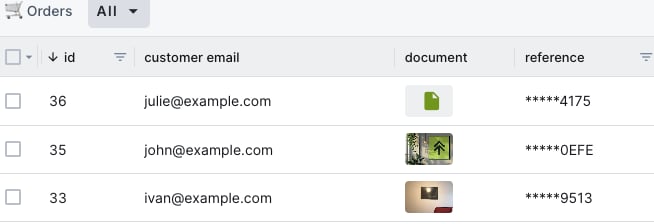
By default, file content is only downloaded on the detail view (single record) to avoid performance issues. On the list view, only file metadata is returned (file icon and name).
If you want image thumbnails to appear on the list view, enable the `download_images_on_list` option. Only images (`image/png`, `image/jpeg`, etc.) will be downloaded. Other file types (PDF, ZIP, etc.) will still show just the file icon.
```ruby theme={null}
@agent.use(ForestAdminRails::Plugins::ActiveStorage, { download_images_on_list: true })
```
 ## Hiding internal collections
Active Storage creates internal tables (`active_storage_attachments`, `active_storage_blobs`, `active_storage_variant_records`) that are automatically exposed by the ActiveRecord data source. These tables are not useful in the admin panel.
By default, the plugin hides these collections. If you need them visible (for example, if you use `has_many_attached` and want to browse attachments via related data), you can disable this behavior:
```ruby theme={null}
@agent.use(ForestAdminRails::Plugins::ActiveStorage, { hide_internal_collections: false })
```
## Limitations
* Only `has_one_attached` is supported. `has_many_attached` is not currently handled by this plugin.
* Works with any Active Storage back-end (local disk, Amazon S3, Google Cloud Storage, Azure Storage, etc.).
## Hiding internal collections
Active Storage creates internal tables (`active_storage_attachments`, `active_storage_blobs`, `active_storage_variant_records`) that are automatically exposed by the ActiveRecord data source. These tables are not useful in the admin panel.
By default, the plugin hides these collections. If you need them visible (for example, if you use `has_many_attached` and want to browse attachments via related data), you can disable this behavior:
```ruby theme={null}
@agent.use(ForestAdminRails::Plugins::ActiveStorage, { hide_internal_collections: false })
```
## Limitations
* Only `has_one_attached` is supported. `has_many_attached` is not currently handled by this plugin.
* Works with any Active Storage back-end (local disk, Amazon S3, Google Cloud Storage, Azure Storage, etc.).