> ## Documentation Index
> Fetch the complete documentation index at: https://forest-chore-open-api.mintlify.site/llms.txt
> Use this file to discover all available pages before exploring further.
# Result types
> Return different types of feedback from your actions
Actions can return different types of results to provide feedback to users. Use the result builder to control what happens after an action executes.
## Default behavior
If you don't return anything and no exception is thrown, Forest displays a generic success notification.
```javascript theme={null}
execute: async (context, resultBuilder) => {
// Perform your logic
// No return = generic success message
}
```
 ## Success notification
Display a custom success message.
```javascript Node.js / Cloud theme={null}
return resultBuilder.success('Company is now live!');
```
```ruby Ruby theme={null}
result_builder.success(message: 'Company is now live!')
```
## Success notification
Display a custom success message.
```javascript Node.js / Cloud theme={null}
return resultBuilder.success('Company is now live!');
```
```ruby Ruby theme={null}
result_builder.success(message: 'Company is now live!')
```
 ## Error notification
Display an error message when something goes wrong.
```javascript Node.js / Cloud theme={null}
if (!isValid) {
return resultBuilder.error('The company was already live!');
}
```
```ruby Ruby theme={null}
if !is_valid
result_builder.error(message: 'The company was already live!')
end
```
## Error notification
Display an error message when something goes wrong.
```javascript Node.js / Cloud theme={null}
if (!isValid) {
return resultBuilder.error('The company was already live!');
}
```
```ruby Ruby theme={null}
if !is_valid
result_builder.error(message: 'The company was already live!')
end
```
 Always handle errors gracefully and return meaningful error messages to help users understand what went wrong.
## HTML result
Return rich formatted content displayed in a side panel. Perfect for showing detailed operation results.
Always handle errors gracefully and return meaningful error messages to help users understand what went wrong.
## HTML result
Return rich formatted content displayed in a side panel. Perfect for showing detailed operation results.
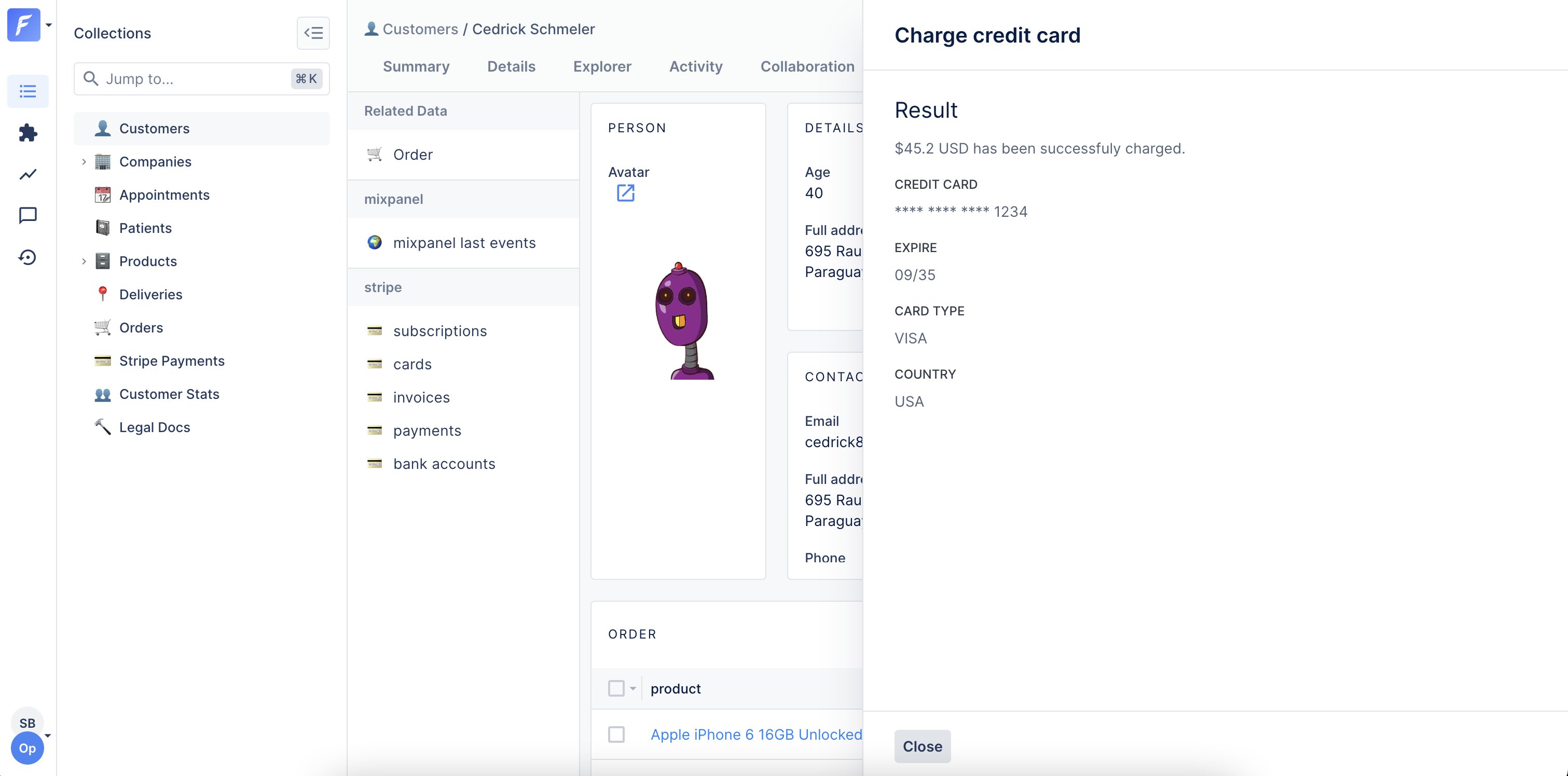 ```javascript Node.js / Cloud theme={null}
return resultBuilder.success('Charge successful', {
html: `
```javascript Node.js / Cloud theme={null}
return resultBuilder.success('Charge successful', {
html: `
$${amount} USD has been successfully charged.
Credit card
**** **** **** ${last4}
Transaction ID
${transactionId}
`,
});
```
```ruby Ruby theme={null}
result_builder.success(
message: 'Charge successful',
options: {
html: "$#{amount} USD has been successfully charged.
Credit card
**** **** **** #{last4}
Transaction ID
#{transaction_id}
"
}
)
```
### HTML with error
You can also return HTML content with an error:
```javascript Node.js / Cloud theme={null}
return resultBuilder.error('Charge failed', {
html: `
$${amount} USD has not been charged.
Reason
The credit card is marked as blocked.
`,
});
```
```ruby Ruby theme={null}
result_builder.error(
'Charge failed',
html: "$#{amount} USD has not been charged.
Reason
The credit card is marked as blocked.
"
)
```
## File download
Generate and download files (PDFs, CSVs, Excel, etc.).
Actions that generate files must set `generateFile: true` in their configuration. This flag prevents using other result types (notifications, HTML) in the same action.
```javascript Node.js / Cloud theme={null}
collection.addAction('Download report', {
scope: 'Global',
generateFile: true, // Required for file downloads
execute: async (context, resultBuilder) => {
// From a string
return resultBuilder.file(
'Report content here',
'report.txt',
'text/plain'
);
// From a Buffer
const buffer = Buffer.from('Report content');
return resultBuilder.file(buffer, 'report.txt', 'text/plain');
// From a stream
const stream = fs.createReadStream('path/to/file.pdf');
return resultBuilder.file(stream, 'report.pdf', 'application/pdf');
},
});
```
```ruby Ruby theme={null}
collection.add_action(
'Download report',
BaseAction.new(
scope: ActionScope::GLOBAL,
is_generate_file: true
) do |_context, result_builder|
file = File.open('report.pdf', 'r')
content = file.read
file.close
result_builder.file(
content: content,
name: 'report.pdf',
mime_type: 'application/pdf'
)
end
)
```
### Common MIME types
| File type | MIME type |
| ------------ | ------------------------------------------------------------------- |
| PDF | `application/pdf` |
| CSV | `text/csv` |
| Excel (xlsx) | `application/vnd.openxmlformats-officedocument.spreadsheetml.sheet` |
| Excel (xls) | `application/vnd.ms-excel` |
| JSON | `application/json` |
| ZIP | `application/zip` |
| Plain text | `text/plain` |
| HTML | `text/html` |
### Example: Generate CSV
```javascript Node.js / Cloud theme={null}
collection.addAction('Export to CSV', {
scope: 'Bulk',
generateFile: true,
execute: async (context, resultBuilder) => {
const records = await context.getRecords(['id', 'name', 'email']);
// Generate CSV content
const header = 'ID,Name,Email\n';
const rows = records.map(r => `${r.id},"${r.name}","${r.email}"`).join('\n');
const csv = header + rows;
return resultBuilder.file(csv, 'export.csv', 'text/csv');
},
});
```
```ruby Ruby theme={null}
collection.add_action(
'Export to CSV',
BaseAction.new(
scope: ActionScope::BULK,
is_generate_file: true
) do |context, result_builder|
records = context.get_records(['id', 'name', 'email'])
# Generate CSV content
header = "ID,Name,Email\n"
rows = records.map { |r| "#{r['id']},\"#{r['name']}\",\"#{r['email']}\"" }.join("\n")
csv = header + rows
result_builder.file(content: csv, name: 'export.csv', mime_type: 'text/csv')
end
)
```
### Example: Generate PDF
```javascript Node.js / Cloud theme={null}
collection.addAction('Generate invoice', {
scope: 'Single',
generateFile: true,
execute: async (context, resultBuilder) => {
const order = await context.getRecord(['id', 'total', 'customer:name']);
// Generate PDF (using a library like pdfkit)
const pdf = await generateInvoicePDF(order);
return resultBuilder.file(
pdf,
`invoice-${order.id}.pdf`,
'application/pdf'
);
},
});
```
```ruby Ruby theme={null}
collection.add_action(
'Generate invoice',
BaseAction.new(
scope: ActionScope::SINGLE,
is_generate_file: true
) do |context, result_builder|
order = context.get_record(['id', 'total', 'customer:name'])
# Generate PDF (using a library like prawn)
pdf = generate_invoice_pdf(order)
result_builder.file(
content: pdf,
name: "invoice-#{order['id']}.pdf",
mime_type: 'application/pdf'
)
end
)
```
## Redirect
Redirect users to another page after the action executes. Works for both internal Forest pages and external URLs.
### Internal redirect
Redirect to another page within Forest:
```javascript Node.js / Cloud theme={null}
return resultBuilder.redirectTo(
'/MyProject/MyEnvironment/MyTeam/data/20/index/record/20/108/activity'
);
```
```ruby Ruby theme={null}
result_builder.redirect_to(
'/MyProject/MyEnvironment/MyTeam/data/20/index/record/20/108/activity'
)
```
### External redirect
Redirect to an external URL:
```javascript Node.js / Cloud theme={null}
return resultBuilder.redirectTo(
'https://www.example.com/tracking?id=ZW924750388GB'
);
```
```ruby Ruby theme={null}
result_builder.redirect_to(
'https://www.example.com/tracking?id=ZW924750388GB'
)
```
### Example: Redirect to created record
```javascript Node.js / Cloud theme={null}
collection.addAction('Create and view', {
scope: 'Global',
execute: async (context, resultBuilder) => {
// Create a new record
const newRecord = await createRecord(context.formValues);
// Redirect to the new record's detail page
return resultBuilder.redirectTo(
`/MyProject/Production/data/companies/index/record/companies/${newRecord.id}/details`
);
},
});
```
```ruby Ruby theme={null}
collection.add_action(
'Create and view',
BaseAction.new(scope: ActionScope::GLOBAL) do |context, result_builder|
# Create a new record
new_record = create_record(context.form_values)
# Redirect to the new record's detail page
result_builder.redirect_to(
"/MyProject/Production/data/companies/index/record/companies/#{new_record['id']}/details"
)
end
)
```
## Webhook
Trigger an HTTP callback from the user's browser. Useful for logging into third-party applications or triggering operations on the user's behalf.
Webhooks are triggered from the user's browser and are subject to CORS restrictions. Make sure the target server accepts requests from Forest domains.
```javascript Node.js / Cloud theme={null}
return resultBuilder.webhook(
'https://api.example.com/callback', // URL
'POST', // Method
{ Authorization: 'Bearer token' }, // Headers
{ userId: 123, action: 'approve' } // Body (JSON)
);
```
```ruby Ruby theme={null}
result_builder.webhook(
url: 'https://api.example.com/callback',
method: 'POST',
headers: { 'Authorization' => 'Bearer token' },
body: { userId: 123, action: 'approve' }
)
```
### Example: Single sign-on
```javascript Node.js / Cloud theme={null}
collection.addAction('Login to external tool', {
scope: 'Single',
execute: async (context, resultBuilder) => {
const user = await context.getRecord(['email', 'externalId']);
// Generate a temporary token
const token = await generateSSOToken(user.externalId);
// Trigger login in the user's browser
return resultBuilder.webhook(
'https://external-tool.com/sso/login',
'POST',
{},
{ token, email: user.email }
);
},
});
```
```ruby Ruby theme={null}
collection.add_action(
'Login to external tool',
BaseAction.new(scope: ActionScope::SINGLE) do |context, result_builder|
user = context.get_record(['email', 'externalId'])
# Generate a temporary token
token = generate_sso_token(user['externalId'])
# Trigger login in the user's browser
result_builder.webhook(
url: 'https://external-tool.com/sso/login',
method: 'POST',
headers: {},
body: { token: token, email: user['email'] }
)
end
)
```
### Example: Trigger background job
```javascript Node.js / Cloud theme={null}
collection.addAction('Process data', {
scope: 'Bulk',
execute: async (context, resultBuilder) => {
const ids = await context.getRecordIds();
// Trigger a background job with user context
return resultBuilder.webhook(
'https://api.mycompany.com/jobs/process',
'POST',
{ 'X-API-Key': process.env.API_KEY },
{
recordIds: ids,
userId: context.caller.id,
triggeredAt: new Date().toISOString()
}
);
},
});
```
```ruby Ruby theme={null}
collection.add_action(
'Process data',
BaseAction.new(scope: ActionScope::BULK) do |context, result_builder|
ids = context.get_record_ids
# Trigger a background job with user context
result_builder.webhook(
url: 'https://api.mycompany.com/jobs/process',
method: 'POST',
headers: { 'X-API-Key' => ENV['API_KEY'] },
body: {
recordIds: ids,
userId: context.caller.id,
triggeredAt: Time.now.iso8601
}
)
end
)
```
## Combining results with operations
### Success with HTML details
```javascript Node.js / Cloud theme={null}
execute: async (context, resultBuilder) => {
const result = await performComplexOperation();
if (result.success) {
return resultBuilder.success('Operation completed', {
html: `
Summary
Processed ${result.count} items
${result.items.map(i => `- ${i}
`).join('')}
`,
});
} else {
return resultBuilder.error('Operation failed', {
html: `Error: ${result.error}
`,
});
}
}
```
```ruby Ruby theme={null}
execute: ->(context, result_builder) {
result = perform_complex_operation
if result[:success]
result_builder.success(
'Operation completed',
html: "Summary
Processed #{result[:count]} items
#{result[:items].map { |i| "- #{i}
" }.join}
"
)
else
result_builder.error(
'Operation failed',
html: "Error: #{result[:error]}
"
)
end
}
```
### Conditional redirect
```javascript Node.js / Cloud theme={null}
execute: async (context, resultBuilder) => {
const order = await context.getRecord(['status', 'id']);
if (order.status === 'pending') {
// Update and redirect to details
await updateOrder(order.id, { status: 'approved' });
return resultBuilder.redirectTo(`/orders/${order.id}`);
} else {
// Already processed
return resultBuilder.error('Order was already processed');
}
}
```
```ruby Ruby theme={null}
execute: ->(context, result_builder) {
order = context.get_record(['status', 'id'])
if order['status'] == 'pending'
# Update and redirect to details
update_order(order['id'], { status: 'approved' })
result_builder.redirect_to("/orders/#{order['id']}")
else
# Already processed
result_builder.error('Order was already processed')
end
}
```