> ## Documentation Index
> Fetch the complete documentation index at: https://forest-chore-open-api.mintlify.site/llms.txt
> Use this file to discover all available pages before exploring further.
# Pagination Configuration
> Configure page size and pagination behavior for collections, and optimize performance on large datasets.
Pagination controls how many records are loaded at once when operators browse a collection. Getting it right balances user experience, showing enough records to be useful, with query performance on large tables.
## Default Behavior
When an operator opens a collection, Forest loads records in pages. Two requests are sent to your back-end for each page load:
1. A query to fetch the records for the current page
2. A query to count the total number of records (used to display page numbers and totals)
By default, collections show **15 records per page**.
## Changing the Page Size
The page size is part of the collection's layout, so the value you set applies to **all operators**, not just you. It is not a personal, per-operator preference.
To change it:
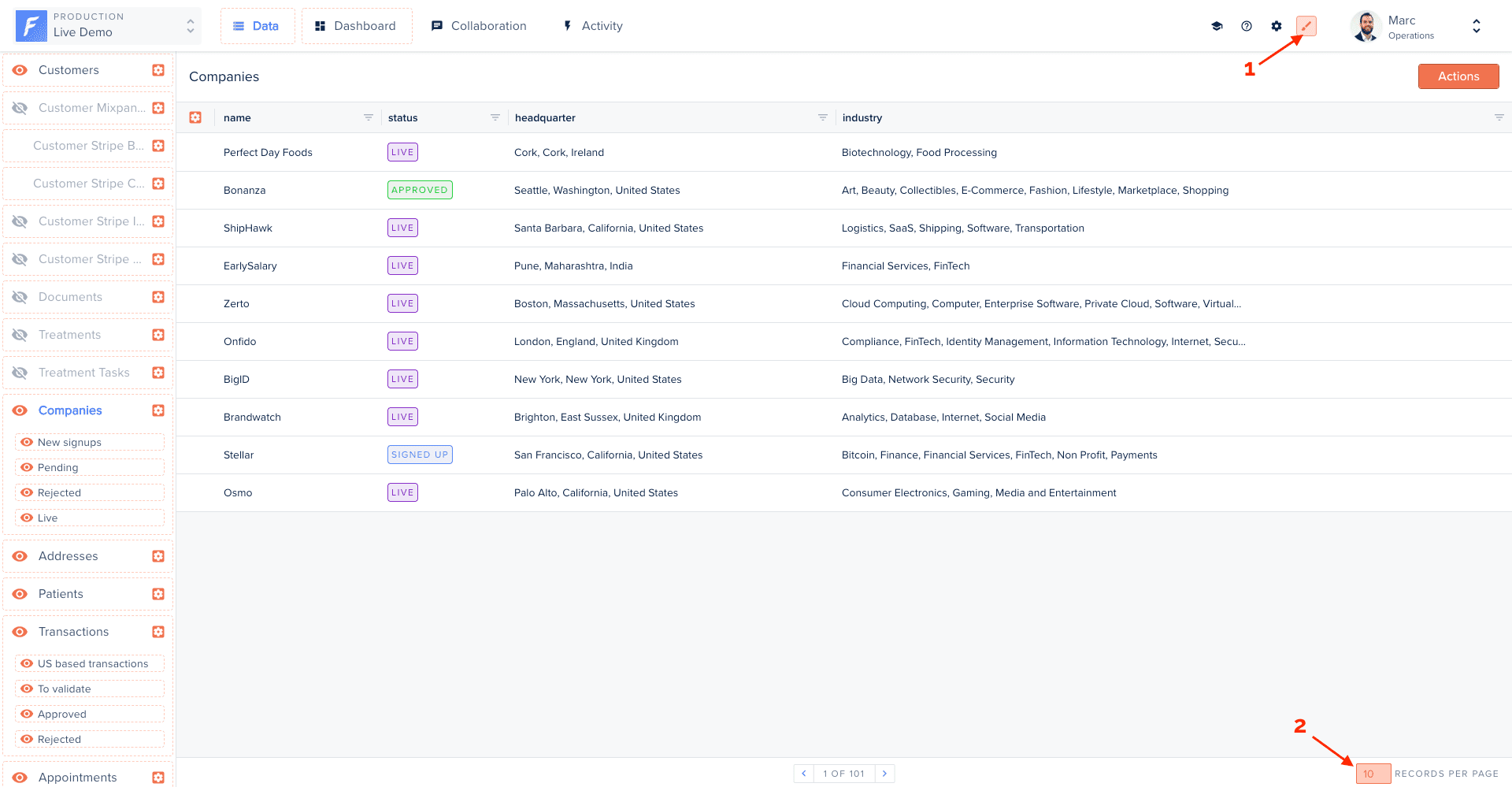
1. Enter **Layout Editor** mode
2. Open the collection's table view
3. Use the page-size selector at the **bottom-right** of the table and pick a value
4. The new page size is saved to the layout and applies to everyone
 Increasing the page size on slow queries significantly impacts load time. Always test with realistic data volumes before changing the default for large tables.
## Disabling the Record Count
The total record count query can be expensive on large tables, especially if the query involves complex filters, joins, or a database without good index coverage.
If the total count isn't needed, disable it per collection:
```javascript Node.js / Cloud theme={null}
agent.customizeCollection('orders', collection => {
collection.disableCount();
});
```
```ruby Ruby theme={null}
@create_agent.customize_collection('orders') do |collection|
collection.disable_count
end
```
```ruby Ruby DSL theme={null}
@create_agent.collection :orders do |collection|
collection.disable_count
end
```
```python Python theme={null}
agent.customize_collection("orders").disable_count()
```
```php PHP theme={null}
use ForestAdmin\AgentPHP\DatasourceCustomizer\CollectionCustomizer;
$forestAgent->customizeCollection(
'Orders',
function (CollectionCustomizer $builder) {
$builder->disableCount();
}
);
```
When count is disabled, the total number of records and page count are not displayed in the table view. Operators can still paginate forward and backward through records.
Disabling count is especially useful for collections backed by large analytical tables, external APIs, or data sources where a COUNT query is particularly slow.
## Performance Recommendations
| Scenario | Recommendation |
| ----------------------------------- | --------------------------------------------------------------------------------- |
| Table has millions of rows | Disable count, use smaller page sizes (10–25) |
| Frequent segment or filter use | Add database indexes on filtered fields |
| Table view has relationship columns | Remove relationship columns from the table view, each row triggers an extra query |
| Smart Fields in table view | Hide Smart Fields not needed at a glance, they compute per row |
For more optimization strategies, see [Layout Maintenance](/guides/best-practices/layout-maintenance).
Increasing the page size on slow queries significantly impacts load time. Always test with realistic data volumes before changing the default for large tables.
## Disabling the Record Count
The total record count query can be expensive on large tables, especially if the query involves complex filters, joins, or a database without good index coverage.
If the total count isn't needed, disable it per collection:
```javascript Node.js / Cloud theme={null}
agent.customizeCollection('orders', collection => {
collection.disableCount();
});
```
```ruby Ruby theme={null}
@create_agent.customize_collection('orders') do |collection|
collection.disable_count
end
```
```ruby Ruby DSL theme={null}
@create_agent.collection :orders do |collection|
collection.disable_count
end
```
```python Python theme={null}
agent.customize_collection("orders").disable_count()
```
```php PHP theme={null}
use ForestAdmin\AgentPHP\DatasourceCustomizer\CollectionCustomizer;
$forestAgent->customizeCollection(
'Orders',
function (CollectionCustomizer $builder) {
$builder->disableCount();
}
);
```
When count is disabled, the total number of records and page count are not displayed in the table view. Operators can still paginate forward and backward through records.
Disabling count is especially useful for collections backed by large analytical tables, external APIs, or data sources where a COUNT query is particularly slow.
## Performance Recommendations
| Scenario | Recommendation |
| ----------------------------------- | --------------------------------------------------------------------------------- |
| Table has millions of rows | Disable count, use smaller page sizes (10–25) |
| Frequent segment or filter use | Add database indexes on filtered fields |
| Table view has relationship columns | Remove relationship columns from the table view, each row triggers an extra query |
| Smart Fields in table view | Hide Smart Fields not needed at a glance, they compute per row |
For more optimization strategies, see [Layout Maintenance](/guides/best-practices/layout-maintenance).