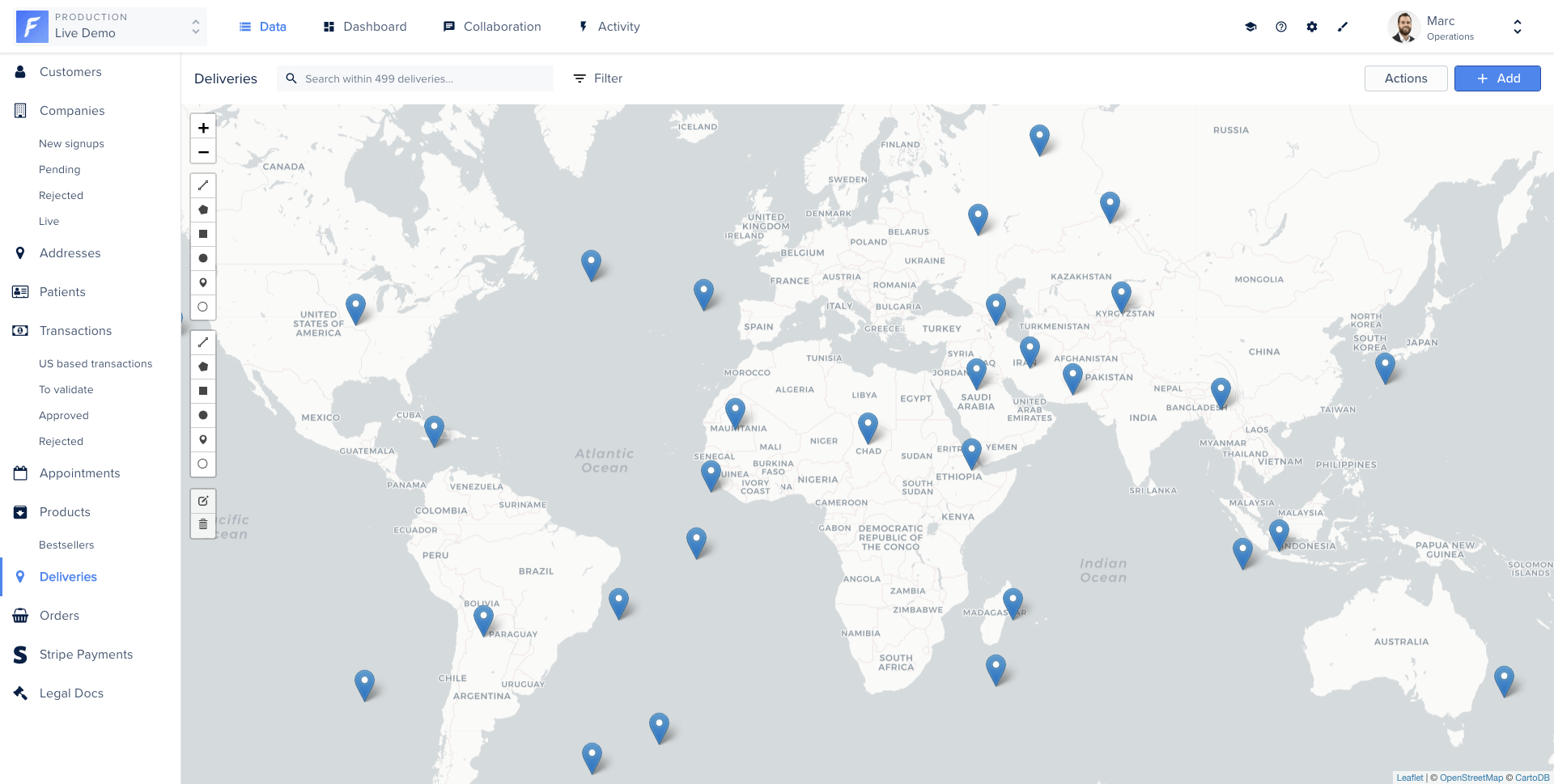
 ## What is a smart view?
A Smart View is a [Glimmer Component](https://api.emberjs.com/ember/3.28/modules/@glimmer%2Fcomponent) composed of three files: a JavaScript component, an HTML/Handlebars template, and a CSS stylesheet. Forest hosts and runs this code directly in your back-office.
## What is a smart view?
A Smart View is a [Glimmer Component](https://api.emberjs.com/ember/3.28/modules/@glimmer%2Fcomponent) composed of three files: a JavaScript component, an HTML/Handlebars template, and a CSS stylesheet. Forest hosts and runs this code directly in your back-office.
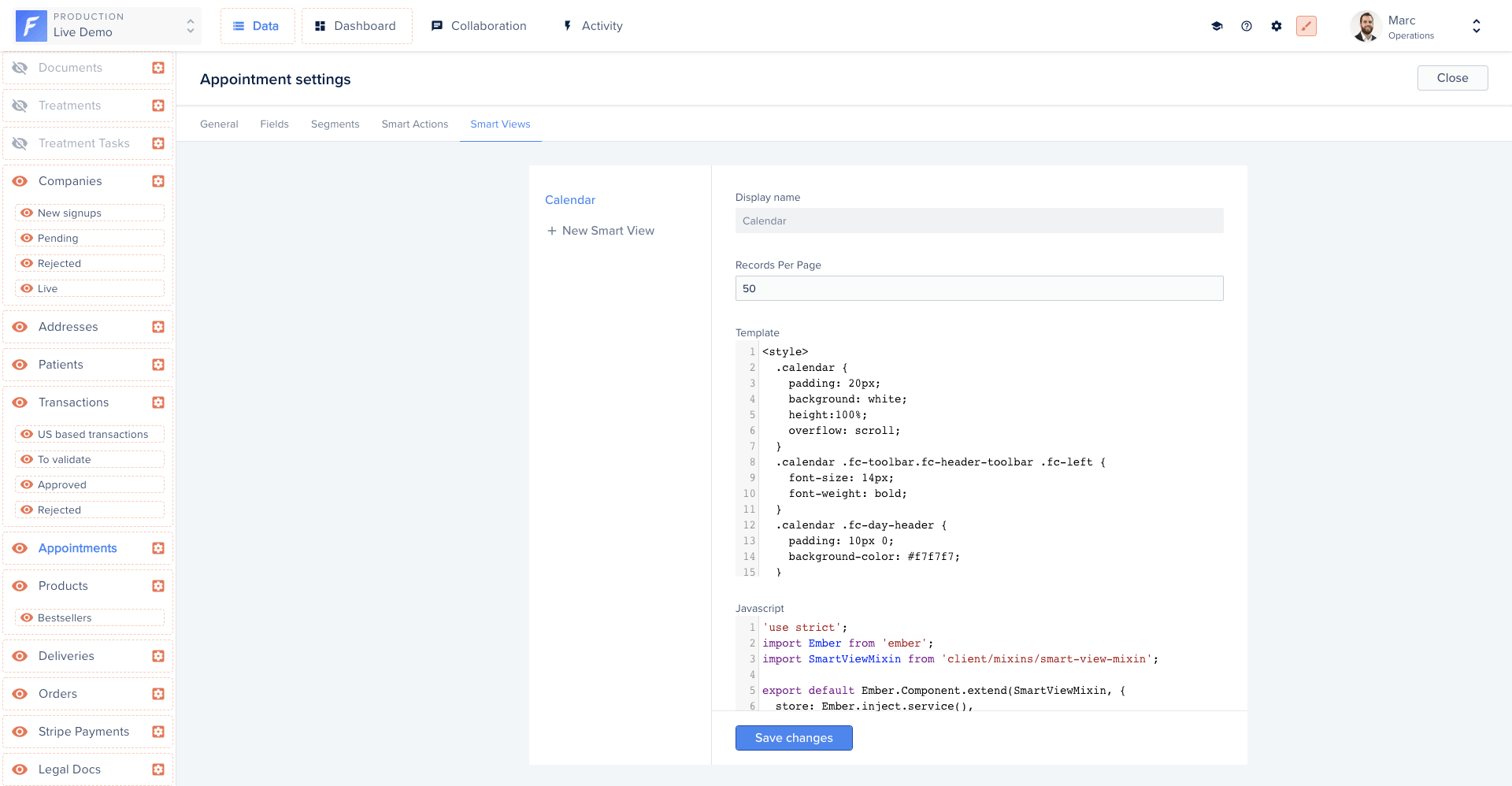 ## Available properties
Forest automatically injects the following properties into your Smart View:
| Property | Type | Description |
| --------------- | ------- | ------------------------------------------------ |
| `collection` | Model | The current collection |
| `currentPage` | Number | The current page |
| `isLoading` | Boolean | Indicates if the UI is currently loading records |
| `numberOfPages` | Number | The total number of available pages |
| `records` | Array | Your data entries |
| `searchValue` | String | The current search value |
## Available actions
Forest also injects the following actions:
| Action | Description |
| ---------------------------------------------------- | ----------------------------------------------------------------- |
| `deleteRecords(records)` | Delete one or multiple records |
| `triggerSmartAction(collection, actionName, record)` | Trigger an action defined on the specified collection on a record |
## Working with records
### Iterating over records
Access all records from the `@records` property and iterate in your template:
```handlebars theme={null}
{{#each @records as |record|}}
{{/each}}
```
### Accessing field values
Access field values using the `forest-` prefix before the field name:
```handlebars theme={null}
{{#each @records as |record|}}
## Available properties
Forest automatically injects the following properties into your Smart View:
| Property | Type | Description |
| --------------- | ------- | ------------------------------------------------ |
| `collection` | Model | The current collection |
| `currentPage` | Number | The current page |
| `isLoading` | Boolean | Indicates if the UI is currently loading records |
| `numberOfPages` | Number | The total number of available pages |
| `records` | Array | Your data entries |
| `searchValue` | String | The current search value |
## Available actions
Forest also injects the following actions:
| Action | Description |
| ---------------------------------------------------- | ----------------------------------------------------------------- |
| `deleteRecords(records)` | Delete one or multiple records |
| `triggerSmartAction(collection, actionName, record)` | Trigger an action defined on the specified collection on a record |
## Working with records
### Iterating over records
Access all records from the `@records` property and iterate in your template:
```handlebars theme={null}
{{#each @records as |record|}}
{{/each}}
```
### Accessing field values
Access field values using the `forest-` prefix before the field name:
```handlebars theme={null}
{{#each @records as |record|}}
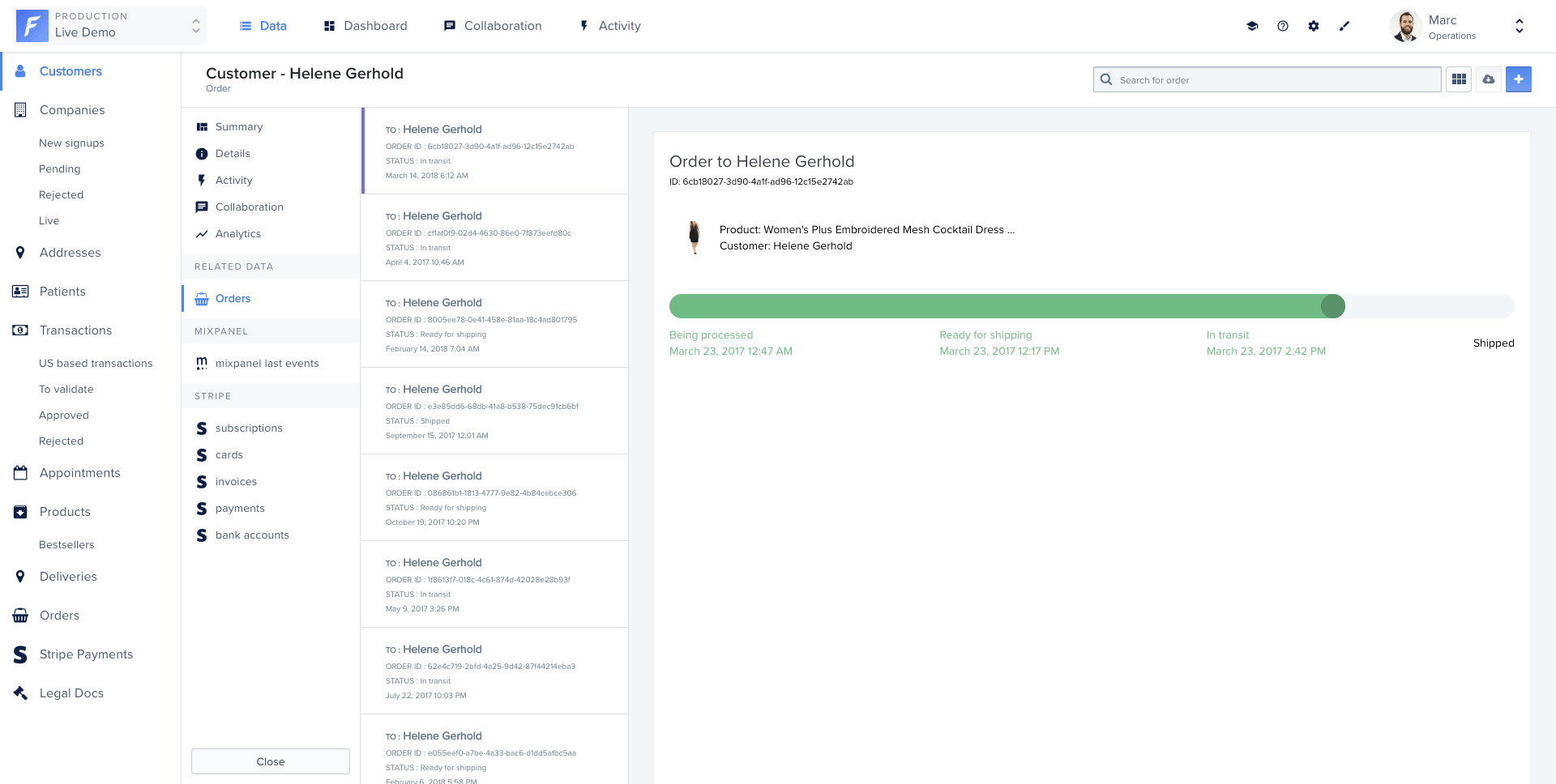
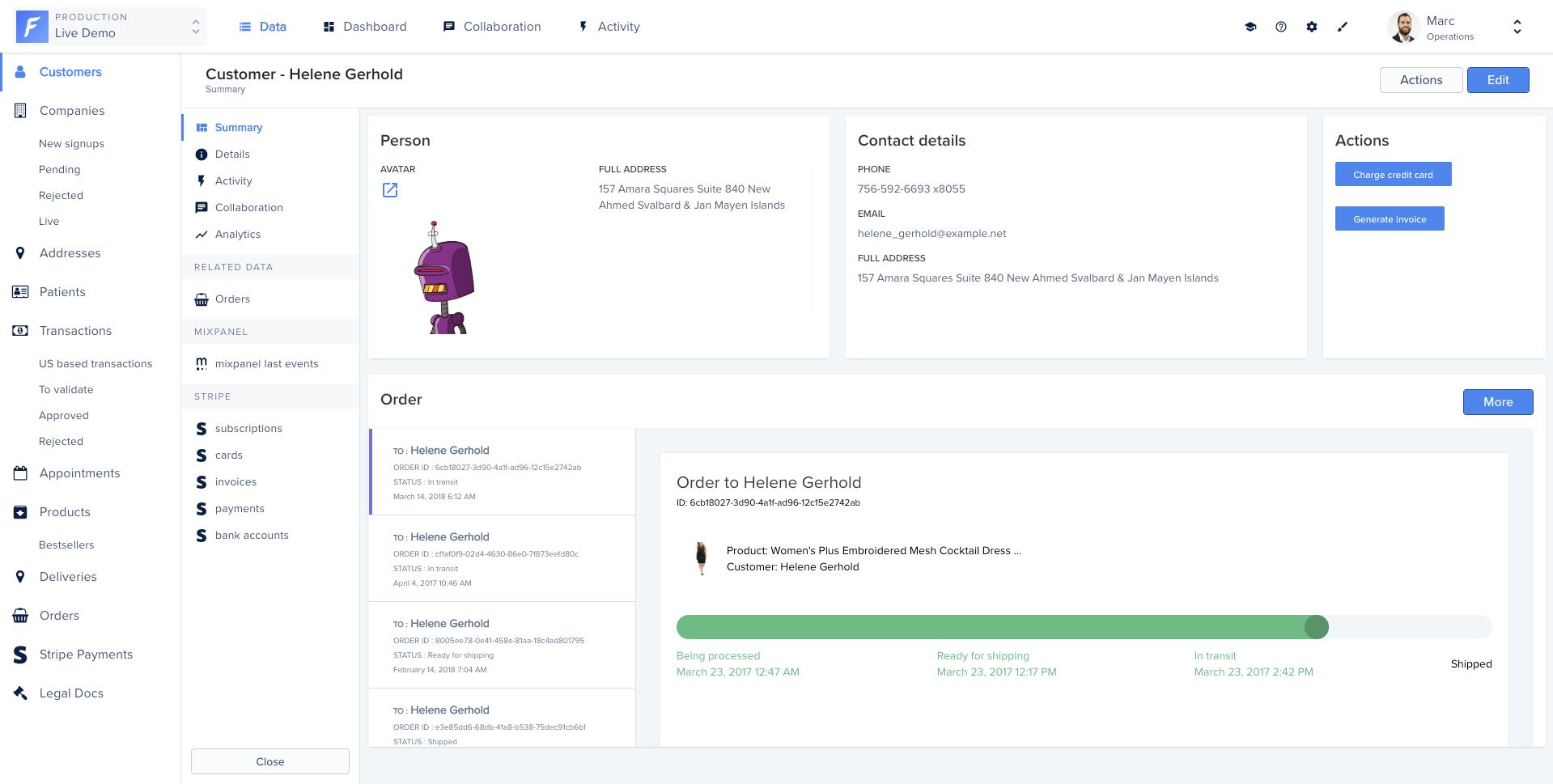
Status: {{record.forest-shipping_status}}
{{/each}} ``` ### Accessing belongsTo relationships Accessing a `belongsTo` relationship works the same as a field. Forest automatically fetches the related data via API when needed: ```handlebars theme={null} {{#each @records as |record|}}{{comment.forest-text}}
{{/each}} {{/each}} ``` ### Refreshing records Call `@fetchRecords` to reload the current page of records: ```handlebars theme={null} ``` ### Fetching records with custom filters Use the `store` service to query any collection with custom filters. In the example below, a calendar view fetches appointments within a date range: ```js title="component.js" theme={null} import Component from '@glimmer/component'; import { inject as service } from '@ember/service'; import { tracked } from '@glimmer/tracking'; export default class extends Component { @service store; @tracked appointments; async fetchData(startDate, endDate) { const params = { filters: JSON.stringify({ aggregator: 'And', conditions: [ { field: 'start_date', operator: 'GreaterThan', value: startDate }, { field: 'start_date', operator: 'LessThan', value: endDate }, ], }), timezone: 'America/Los_Angeles', 'page[number]': 1, 'page[size]': 50, }; this.appointments = await this.store.query('forest_appointment', params); } } ``` ```handlebars title="template.hbs" theme={null} {{#each this.appointments as |appointment|}}{{appointment.id}}
{{appointment.forest-name}}
{{/each}} ``` #### Query parameters | Parameter | Type | Description | | -------------- | ------ | -------------------------------------------------------------------------------------------------------------------------------------------------------------------------------------------------------------------------------------------------------------------------------------------------------------- | | `filters` | Object | A stringified JSON object. A single filter uses `{ field, operator, value }`. An aggregation uses `{ aggregator: "and"/"or", conditions: [...] }`. Operators: `less_than`, `greater_than`, `equal`, `after`, `before`, `contains`, `starts_with`, `ends_with`, `not_contains`, `present`, `not_equal`, `blank` | | `timezone` | String | Timezone string, e.g. `America/Los_Angeles` | | `page[number]` | Number | Page number to fetch | | `page[size]` | Number | Number of records per page | ## Deleting records The `deleteRecords` action deletes one or multiple records. A confirmation dialog is shown automatically. ```handlebars title="template.hbs" theme={null} {{#each @records as |record|}}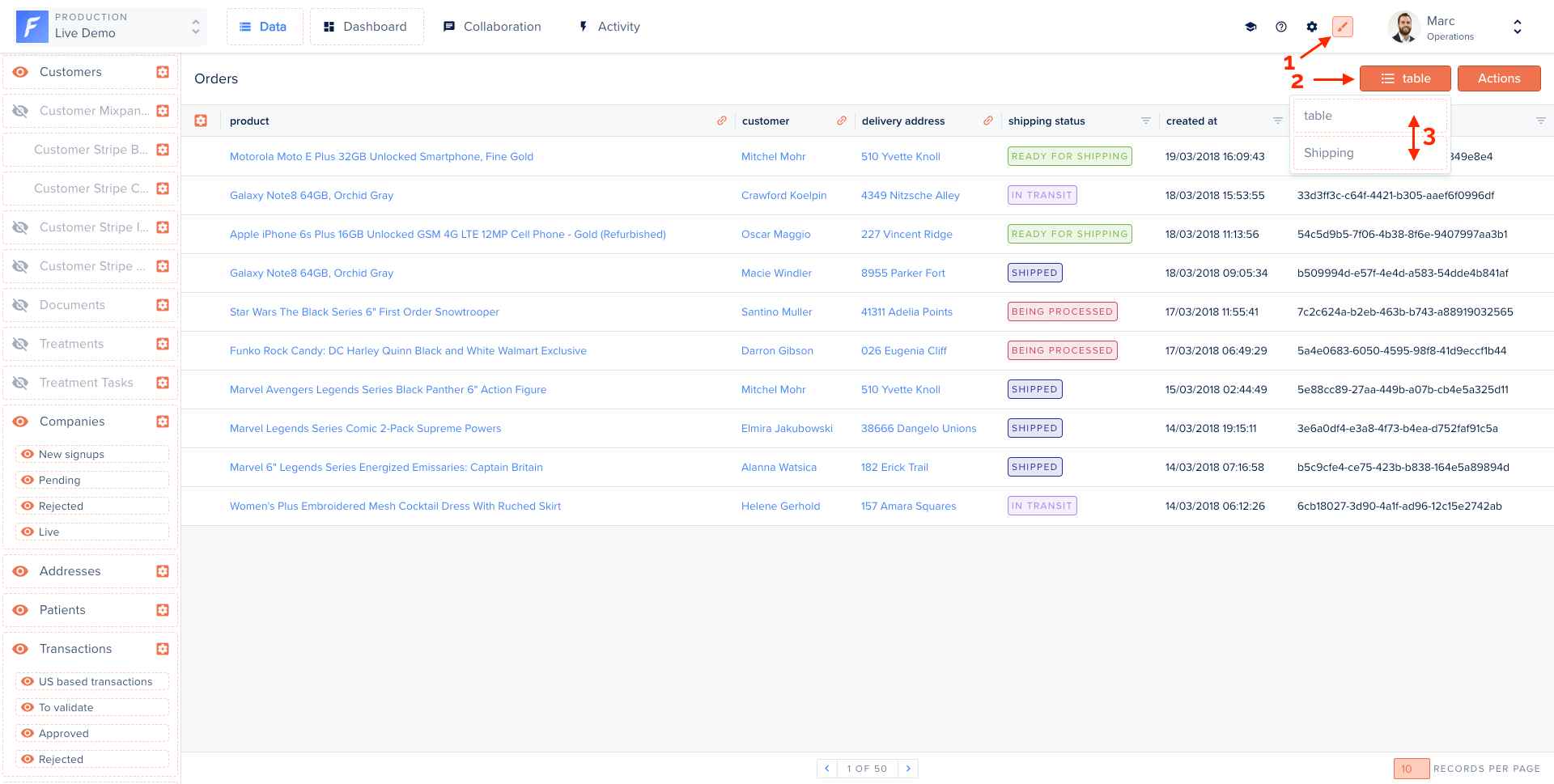
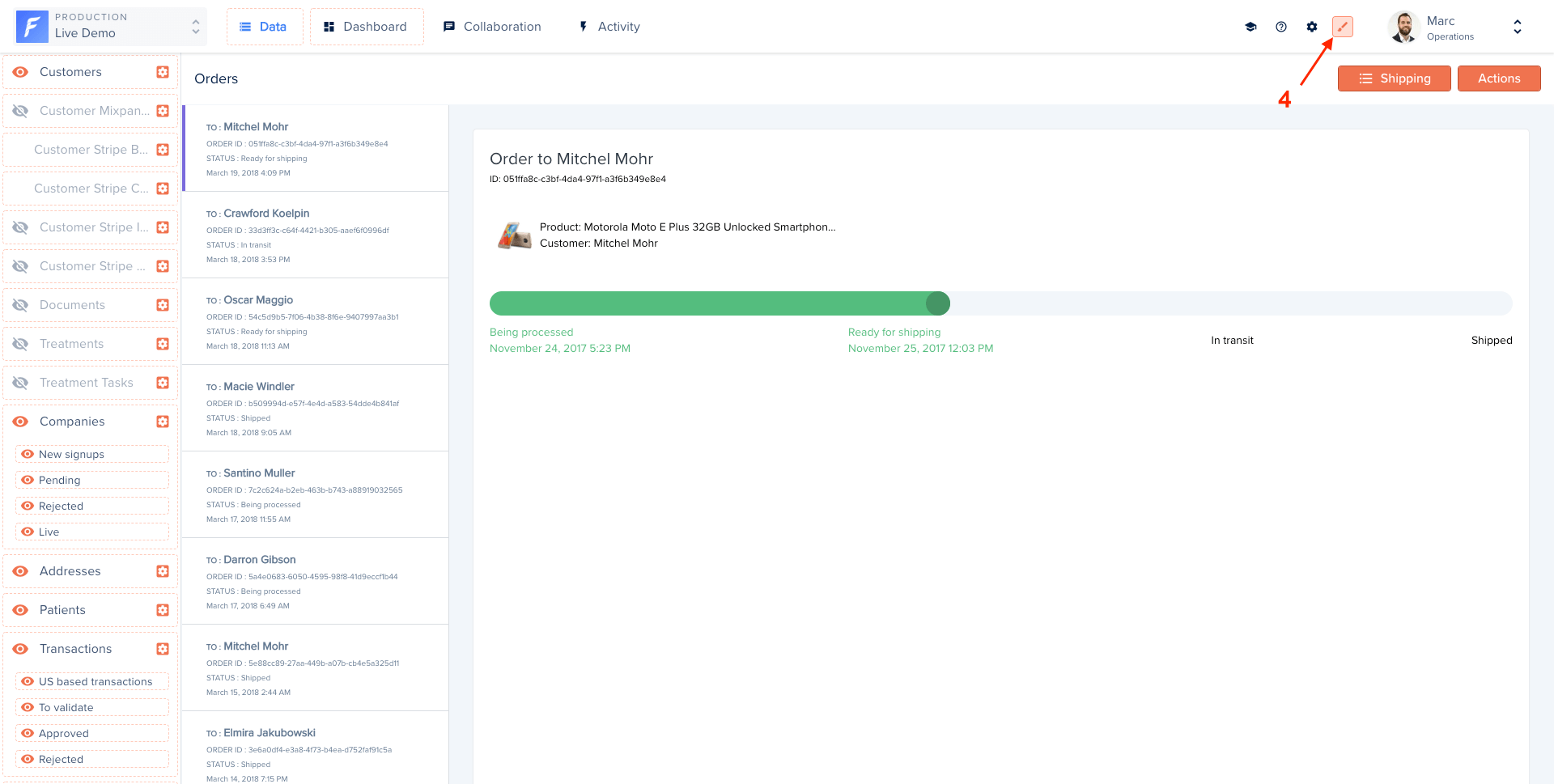 The view refreshes automatically. Disable Layout Editor mode when done.
 ## Examples
### Calendar view
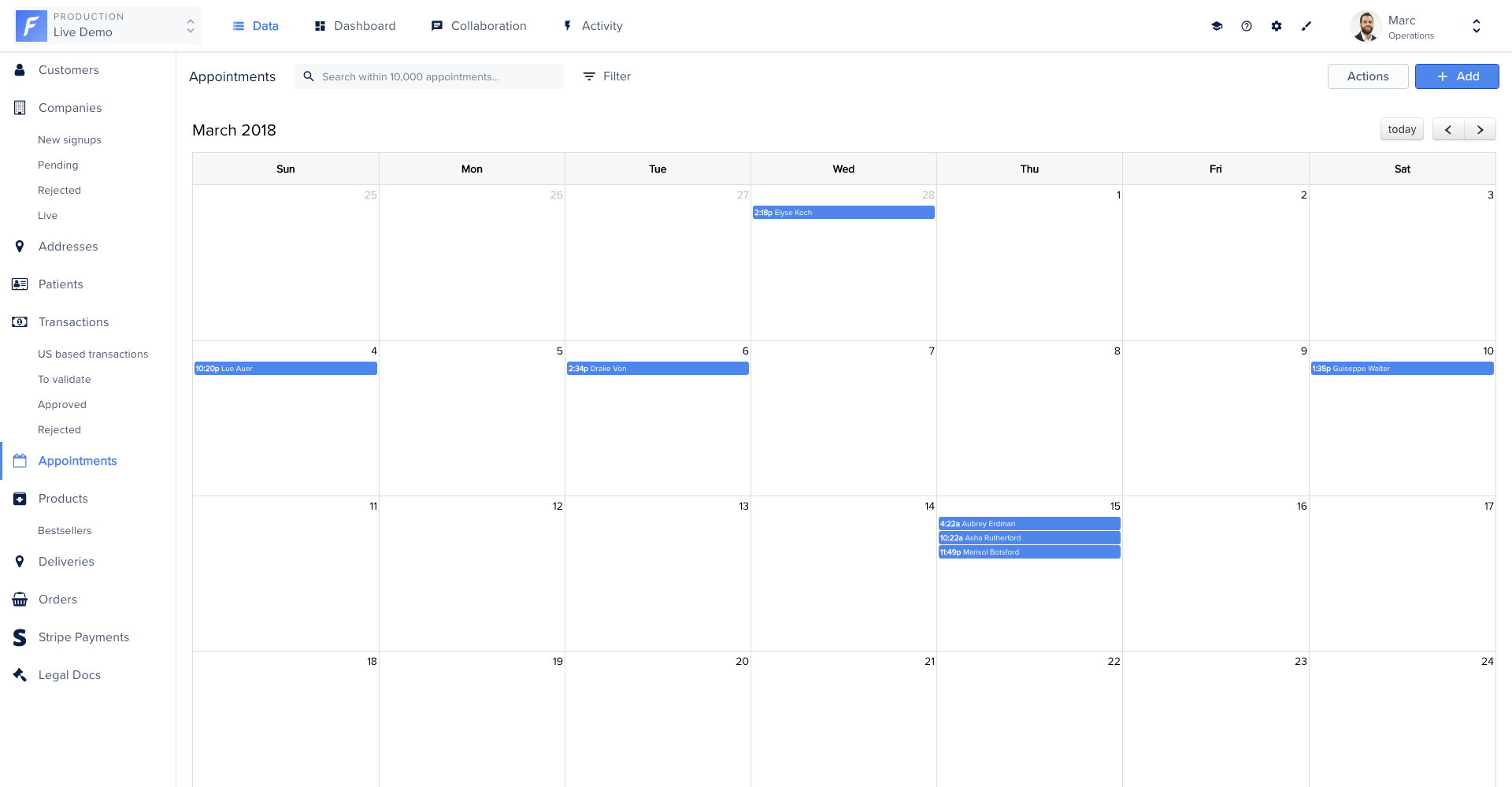
Displays collection records on a calendar using [FullCalendar](https://fullcalendar.io/). The component loads the library from CDN and uses date-range conditions to fetch relevant records.
## Examples
### Calendar view
Displays collection records on a calendar using [FullCalendar](https://fullcalendar.io/). The component loads the library from CDN and uses date-range conditions to fetch relevant records.
 ```js title="component.js" theme={null}
import Component from '@glimmer/component';
import { inject as service } from '@ember/service';
import { action } from '@ember/object';
import { tracked } from '@glimmer/tracking';
import { guidFor } from '@ember/object/internals';
import {
triggerSmartAction,
deleteRecords,
loadExternalStyle,
loadExternalJavascript,
} from 'client/utils/smart-view-utils';
export default class extends Component {
@service() router;
@service() store;
@tracked conditionAfter = null;
@tracked conditionBefore = null;
@tracked loaded = false;
constructor(...args) {
super(...args);
this.loadPlugin();
}
get calendarId() {
return `${guidFor(this)}-calendar`;
}
async loadPlugin() {
loadExternalStyle(
'https://cdn.jsdelivr.net/npm/fullcalendar@6.1.8/index.global.min.css',
);
await loadExternalJavascript(
'https://cdn.jsdelivr.net/npm/fullcalendar@6.1.8/index.global.min.js',
);
this.loaded = true;
this.onInsert();
}
@action
onInsert() {
if (!this.loaded || !document.getElementById(this.calendarId)) return;
this.calendar = new FullCalendar.Calendar(
document.getElementById(this.calendarId),
{
allDaySlot: false,
minTime: '00:00:00',
initialDate: new Date(2018, 2, 1),
eventClick: ({ event }) => {
this.router.transitionTo(
'project.rendering.data.collection.list.view-edit.details',
this.args.collection.id,
event.id,
);
},
events: async (info, successCallback) => {
const field = this.args.collection.fields.findBy('fieldName', 'start_date');
if (this.conditionAfter) {
this.args.removeCondition(this.conditionAfter, true);
this.conditionAfter.unloadRecord();
}
if (this.conditionBefore) {
this.args.removeCondition(this.conditionBefore, true);
this.conditionBefore.unloadRecord();
}
const conditionAfter = this.store.createFragment('fragment-condition');
conditionAfter.set('field', field);
conditionAfter.set('operator', 'is after');
conditionAfter.set('value', info.start);
conditionAfter.set('smartView', this.args.viewList);
this.conditionAfter = conditionAfter;
const conditionBefore = this.store.createFragment('fragment-condition');
conditionBefore.set('field', field);
conditionBefore.set('operator', 'is before');
conditionBefore.set('value', info.end);
conditionBefore.set('smartView', this.args.viewList);
this.conditionBefore = conditionBefore;
this.args.addCondition(conditionAfter, true);
this.args.addCondition(conditionBefore, true);
await this.args.fetchRecords({ page: 1 });
successCallback(
this.args.records?.map(appointment => ({
id: appointment.get('id'),
title: appointment.get('forest-name'),
start: appointment.get('forest-start_date'),
end: appointment.get('forest-end_date'),
})),
);
},
},
);
this.calendar.render();
}
@action
triggerSmartAction(...args) {
return triggerSmartAction(this, ...args);
}
@action
deleteRecords(...args) {
return deleteRecords(this, ...args);
}
}
```
```css title="style.css" theme={null}
.calendar {
padding: 20px;
background: var(--color-beta-surface);
height: 100%;
overflow: scroll;
}
.calendar .fc-day-header {
padding: 10px 0;
background-color: var(--color-beta-secondary);
color: var(--color-beta-on-secondary_dark);
}
.calendar .fc-event {
background-color: var(--color-beta-secondary);
border: 1px solid var(--color-beta-on-secondary_border);
color: var(--color-beta-on-secondary_medium);
font-size: 14px;
}
.c-smart-view {
display: flex;
white-space: normal;
position: absolute;
bottom: 0;
left: 0;
right: 0;
top: 0;
background-color: var(--color-beta-surface);
}
```
```handlebars title="template.hbs" theme={null}
```
### Map view
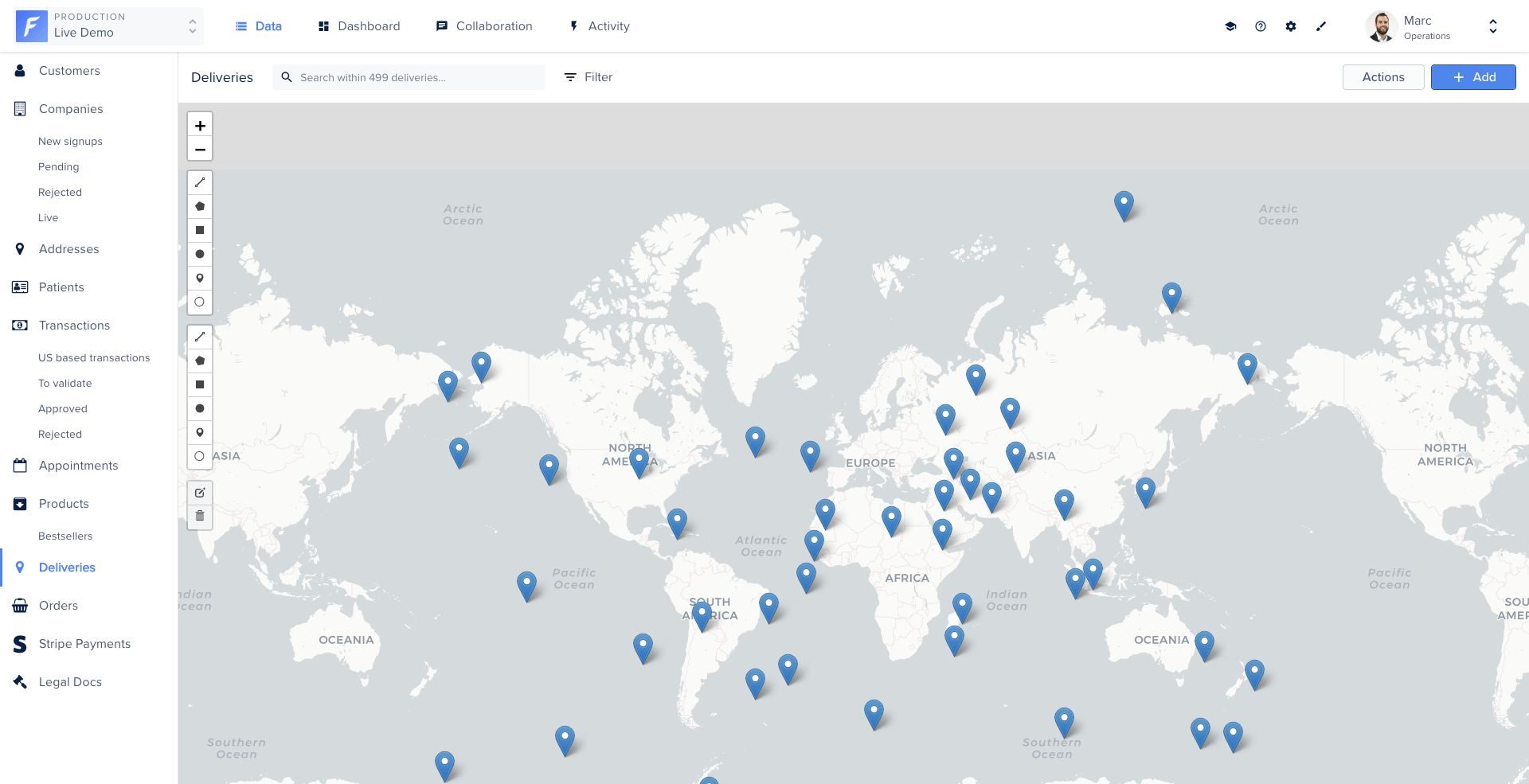
Displays geo-located records on an interactive map using [Leaflet](https://leafletjs.com/). Clicking a marker opens the corresponding record. New records can be created by placing a marker.
```js title="component.js" theme={null}
import Component from '@glimmer/component';
import { inject as service } from '@ember/service';
import { action } from '@ember/object';
import { tracked } from '@glimmer/tracking';
import { guidFor } from '@ember/object/internals';
import {
triggerSmartAction,
deleteRecords,
loadExternalStyle,
loadExternalJavascript,
} from 'client/utils/smart-view-utils';
export default class extends Component {
@service() router;
@service() store;
@tracked conditionAfter = null;
@tracked conditionBefore = null;
@tracked loaded = false;
constructor(...args) {
super(...args);
this.loadPlugin();
}
get calendarId() {
return `${guidFor(this)}-calendar`;
}
async loadPlugin() {
loadExternalStyle(
'https://cdn.jsdelivr.net/npm/fullcalendar@6.1.8/index.global.min.css',
);
await loadExternalJavascript(
'https://cdn.jsdelivr.net/npm/fullcalendar@6.1.8/index.global.min.js',
);
this.loaded = true;
this.onInsert();
}
@action
onInsert() {
if (!this.loaded || !document.getElementById(this.calendarId)) return;
this.calendar = new FullCalendar.Calendar(
document.getElementById(this.calendarId),
{
allDaySlot: false,
minTime: '00:00:00',
initialDate: new Date(2018, 2, 1),
eventClick: ({ event }) => {
this.router.transitionTo(
'project.rendering.data.collection.list.view-edit.details',
this.args.collection.id,
event.id,
);
},
events: async (info, successCallback) => {
const field = this.args.collection.fields.findBy('fieldName', 'start_date');
if (this.conditionAfter) {
this.args.removeCondition(this.conditionAfter, true);
this.conditionAfter.unloadRecord();
}
if (this.conditionBefore) {
this.args.removeCondition(this.conditionBefore, true);
this.conditionBefore.unloadRecord();
}
const conditionAfter = this.store.createFragment('fragment-condition');
conditionAfter.set('field', field);
conditionAfter.set('operator', 'is after');
conditionAfter.set('value', info.start);
conditionAfter.set('smartView', this.args.viewList);
this.conditionAfter = conditionAfter;
const conditionBefore = this.store.createFragment('fragment-condition');
conditionBefore.set('field', field);
conditionBefore.set('operator', 'is before');
conditionBefore.set('value', info.end);
conditionBefore.set('smartView', this.args.viewList);
this.conditionBefore = conditionBefore;
this.args.addCondition(conditionAfter, true);
this.args.addCondition(conditionBefore, true);
await this.args.fetchRecords({ page: 1 });
successCallback(
this.args.records?.map(appointment => ({
id: appointment.get('id'),
title: appointment.get('forest-name'),
start: appointment.get('forest-start_date'),
end: appointment.get('forest-end_date'),
})),
);
},
},
);
this.calendar.render();
}
@action
triggerSmartAction(...args) {
return triggerSmartAction(this, ...args);
}
@action
deleteRecords(...args) {
return deleteRecords(this, ...args);
}
}
```
```css title="style.css" theme={null}
.calendar {
padding: 20px;
background: var(--color-beta-surface);
height: 100%;
overflow: scroll;
}
.calendar .fc-day-header {
padding: 10px 0;
background-color: var(--color-beta-secondary);
color: var(--color-beta-on-secondary_dark);
}
.calendar .fc-event {
background-color: var(--color-beta-secondary);
border: 1px solid var(--color-beta-on-secondary_border);
color: var(--color-beta-on-secondary_medium);
font-size: 14px;
}
.c-smart-view {
display: flex;
white-space: normal;
position: absolute;
bottom: 0;
left: 0;
right: 0;
top: 0;
background-color: var(--color-beta-surface);
}
```
```handlebars title="template.hbs" theme={null}
```
### Map view
Displays geo-located records on an interactive map using [Leaflet](https://leafletjs.com/). Clicking a marker opens the corresponding record. New records can be created by placing a marker.
 ```js title="component.js" theme={null}
import Component from '@glimmer/component';
import { inject as service } from '@ember/service';
import { action } from '@ember/object';
import { tracked } from '@glimmer/tracking';
import { guidFor } from '@ember/object/internals';
import {
triggerSmartAction,
deleteRecords,
loadExternalStyle,
loadExternalJavascript,
} from 'client/utils/smart-view-utils';
export default class extends Component {
@service router;
@service store;
@tracked map = null;
@tracked loaded = false;
constructor(...args) {
super(...args);
this.loadPlugin();
}
get mapId() {
return `map-${guidFor(this)}`;
}
async loadPlugin() {
loadExternalStyle('//cdnjs.cloudflare.com/ajax/libs/leaflet/1.3.4/leaflet.css');
loadExternalStyle('//cdnjs.cloudflare.com/ajax/libs/leaflet.draw/1.0.4/leaflet.draw.css');
await loadExternalJavascript('//cdnjs.cloudflare.com/ajax/libs/leaflet/1.3.4/leaflet.js');
await loadExternalJavascript('//cdnjs.cloudflare.com/ajax/libs/leaflet.draw/1.0.4/leaflet.draw.js');
this.loaded = true;
this.displayMap();
}
@action
displayMap() {
if (!this.loaded) return;
if (this.map) {
this.map.off();
this.map.remove();
this.map = null;
}
const markers = [];
this.args.records?.forEach(record => {
markers.push([record.get('forest-lat'), record.get('forest-lng'), record.get('id')]);
});
this.map = new L.Map(this.mapId);
const osmUrl = 'https://cartodb-basemaps-{s}.global.ssl.fastly.net/light_all/{z}/{x}/{y}.png';
const osmAttrib = '© OpenStreetMap © CartoDB';
const osm = new L.TileLayer(osmUrl, { attribution: osmAttrib });
const drawnItems = new L.FeatureGroup();
this.map.addLayer(drawnItems);
const drawControl = new L.Control.Draw({
draw: { polygon: false, polyline: false, rectangle: false, circle: false, circlemarker: false, marker: true },
edit: { featureGroup: drawnItems },
});
this.map.setView(new L.LatLng(48.8566, 2.3522), 2);
this.map.addLayer(osm);
this.map.addControl(drawControl);
this.map.on(L.Draw.Event.CREATED, event => {
const { layer, layerType: type } = event;
if (type === 'marker') {
const coordinates = event.layer.getLatLng();
const newRecord = this.store.createRecord('forest_delivery', {
'forest-is_delivered': false,
'forest-lng': coordinates.lng,
'forest-lat': coordinates.lat,
});
newRecord.save().then(savedRecord => {
layer.on('click', () => {
this.router.transitionTo(
'project.rendering.data.collection.list.view-edit.details',
this.args.collection.id,
savedRecord.id,
);
});
});
}
this.map.addLayer(layer);
});
markers.forEach(([lat, lng, id]) => {
const marker = L.marker([parseFloat(lat), parseFloat(lng)]).addTo(this.map);
marker.on('click', () => {
this.router.transitionTo(
'project.rendering.data.collection.list.view-edit.details',
this.args.collection.id,
id,
);
});
});
}
@action
triggerSmartAction(...args) {
return triggerSmartAction(this, ...args);
}
@action
deleteRecords(...args) {
return deleteRecords(this, ...args);
}
}
```
```css title="style.css" theme={null}
.c-map {
width: 100%;
height: 100%;
z-index: 4;
}
.c-smart-view {
display: flex;
white-space: normal;
position: absolute;
bottom: 0;
left: 0;
right: 0;
top: 0;
background-color: var(--color-beta-surface);
}
```
```handlebars title="template.hbs" theme={null}
```
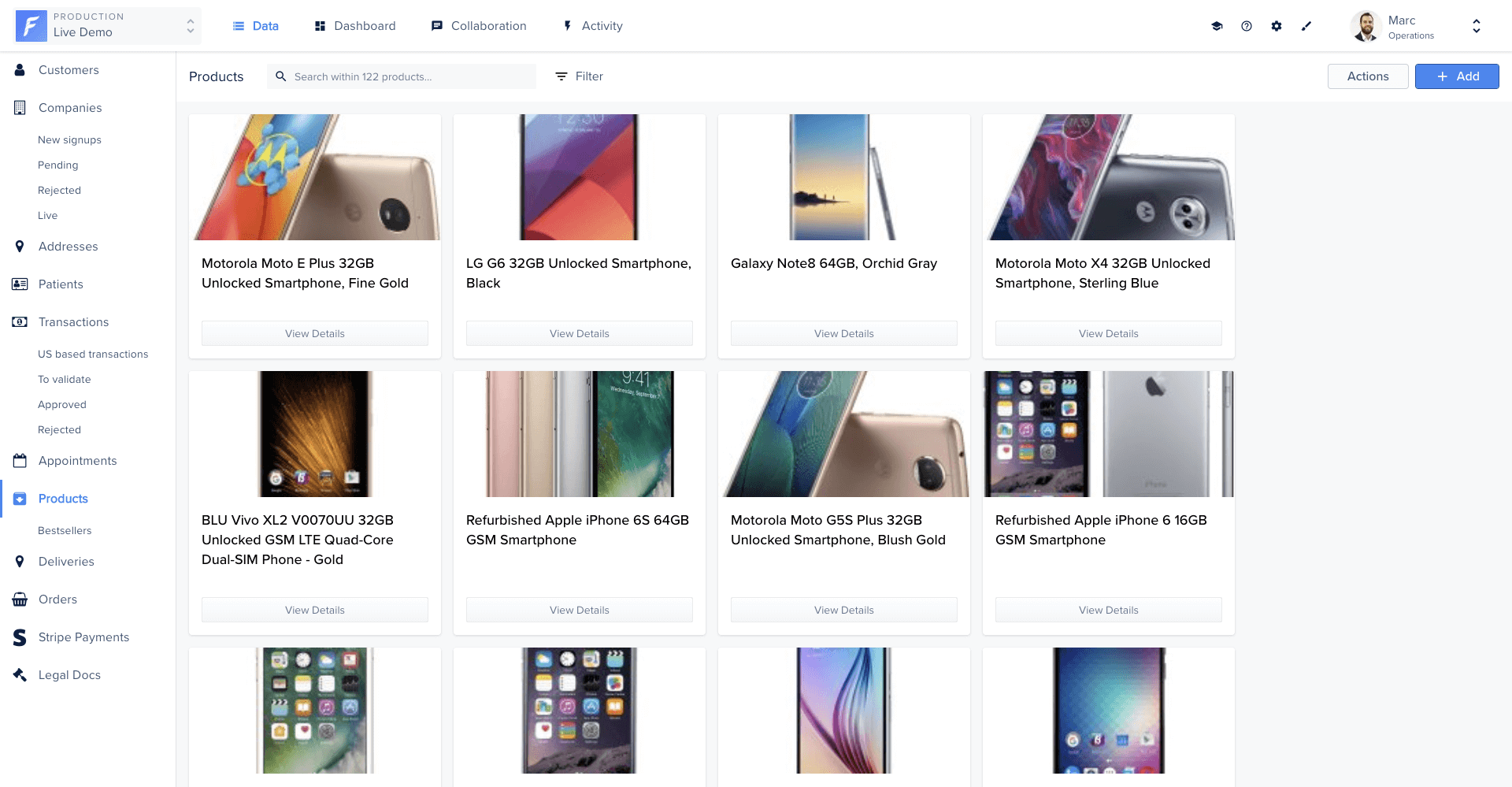
### Gallery view
Displays records as a grid of images. Each image links to the corresponding record's detail page.
```js title="component.js" theme={null}
import Component from '@glimmer/component';
import { inject as service } from '@ember/service';
import { action } from '@ember/object';
import { tracked } from '@glimmer/tracking';
import { guidFor } from '@ember/object/internals';
import {
triggerSmartAction,
deleteRecords,
loadExternalStyle,
loadExternalJavascript,
} from 'client/utils/smart-view-utils';
export default class extends Component {
@service router;
@service store;
@tracked map = null;
@tracked loaded = false;
constructor(...args) {
super(...args);
this.loadPlugin();
}
get mapId() {
return `map-${guidFor(this)}`;
}
async loadPlugin() {
loadExternalStyle('//cdnjs.cloudflare.com/ajax/libs/leaflet/1.3.4/leaflet.css');
loadExternalStyle('//cdnjs.cloudflare.com/ajax/libs/leaflet.draw/1.0.4/leaflet.draw.css');
await loadExternalJavascript('//cdnjs.cloudflare.com/ajax/libs/leaflet/1.3.4/leaflet.js');
await loadExternalJavascript('//cdnjs.cloudflare.com/ajax/libs/leaflet.draw/1.0.4/leaflet.draw.js');
this.loaded = true;
this.displayMap();
}
@action
displayMap() {
if (!this.loaded) return;
if (this.map) {
this.map.off();
this.map.remove();
this.map = null;
}
const markers = [];
this.args.records?.forEach(record => {
markers.push([record.get('forest-lat'), record.get('forest-lng'), record.get('id')]);
});
this.map = new L.Map(this.mapId);
const osmUrl = 'https://cartodb-basemaps-{s}.global.ssl.fastly.net/light_all/{z}/{x}/{y}.png';
const osmAttrib = '© OpenStreetMap © CartoDB';
const osm = new L.TileLayer(osmUrl, { attribution: osmAttrib });
const drawnItems = new L.FeatureGroup();
this.map.addLayer(drawnItems);
const drawControl = new L.Control.Draw({
draw: { polygon: false, polyline: false, rectangle: false, circle: false, circlemarker: false, marker: true },
edit: { featureGroup: drawnItems },
});
this.map.setView(new L.LatLng(48.8566, 2.3522), 2);
this.map.addLayer(osm);
this.map.addControl(drawControl);
this.map.on(L.Draw.Event.CREATED, event => {
const { layer, layerType: type } = event;
if (type === 'marker') {
const coordinates = event.layer.getLatLng();
const newRecord = this.store.createRecord('forest_delivery', {
'forest-is_delivered': false,
'forest-lng': coordinates.lng,
'forest-lat': coordinates.lat,
});
newRecord.save().then(savedRecord => {
layer.on('click', () => {
this.router.transitionTo(
'project.rendering.data.collection.list.view-edit.details',
this.args.collection.id,
savedRecord.id,
);
});
});
}
this.map.addLayer(layer);
});
markers.forEach(([lat, lng, id]) => {
const marker = L.marker([parseFloat(lat), parseFloat(lng)]).addTo(this.map);
marker.on('click', () => {
this.router.transitionTo(
'project.rendering.data.collection.list.view-edit.details',
this.args.collection.id,
id,
);
});
});
}
@action
triggerSmartAction(...args) {
return triggerSmartAction(this, ...args);
}
@action
deleteRecords(...args) {
return deleteRecords(this, ...args);
}
}
```
```css title="style.css" theme={null}
.c-map {
width: 100%;
height: 100%;
z-index: 4;
}
.c-smart-view {
display: flex;
white-space: normal;
position: absolute;
bottom: 0;
left: 0;
right: 0;
top: 0;
background-color: var(--color-beta-surface);
}
```
```handlebars title="template.hbs" theme={null}
```
### Gallery view
Displays records as a grid of images. Each image links to the corresponding record's detail page.
 ```js title="component.js" theme={null}
import Component from '@glimmer/component';
import { action } from '@ember/object';
import { triggerSmartAction, deleteRecords } from 'client/utils/smart-view-utils';
export default class extends Component {
@action
triggerSmartAction(...args) {
return triggerSmartAction(this, ...args);
}
@action
deleteRecords(...args) {
return deleteRecords(this, ...args);
}
}
```
```css title="style.css" theme={null}
.l-gallery-view-container {
flex-grow: 1;
width: 100%;
height: 100%;
overflow: hidden;
position: relative;
}
.c-gallery {
padding: 15px;
overflow-y: auto;
width: 100%;
position: absolute;
left: 0;
top: 0;
bottom: 40px;
}
.c-gallery__image {
height: 182px;
width: 182px;
margin: 3px;
border: 1px solid var(--color-beta-on-surface_border);
border-radius: 3px;
transition: all 0.3s ease-out;
}
.c-gallery__image:hover {
transform: scale(1.05);
}
```
```handlebars title="template.hbs" theme={null}
```js title="component.js" theme={null}
import Component from '@glimmer/component';
import { action } from '@ember/object';
import { triggerSmartAction, deleteRecords } from 'client/utils/smart-view-utils';
export default class extends Component {
@action
triggerSmartAction(...args) {
return triggerSmartAction(this, ...args);
}
@action
deleteRecords(...args) {
return deleteRecords(this, ...args);
}
}
```
```css title="style.css" theme={null}
.l-gallery-view-container {
flex-grow: 1;
width: 100%;
height: 100%;
overflow: hidden;
position: relative;
}
.c-gallery {
padding: 15px;
overflow-y: auto;
width: 100%;
position: absolute;
left: 0;
top: 0;
bottom: 40px;
}
.c-gallery__image {
height: 182px;
width: 182px;
margin: 3px;
border: 1px solid var(--color-beta-on-surface_border);
border-radius: 3px;
transition: all 0.3s ease-out;
}
.c-gallery__image:hover {
transform: scale(1.05);
}
```
```handlebars title="template.hbs" theme={null}
 ```js title="component.js" theme={null}
import Component from '@glimmer/component';
import { action } from '@ember/object';
import { tracked } from '@glimmer/tracking';
import { triggerSmartAction, deleteRecords } from 'client/utils/smart-view-utils';
export default class extends Component {
@tracked currentRecord = null;
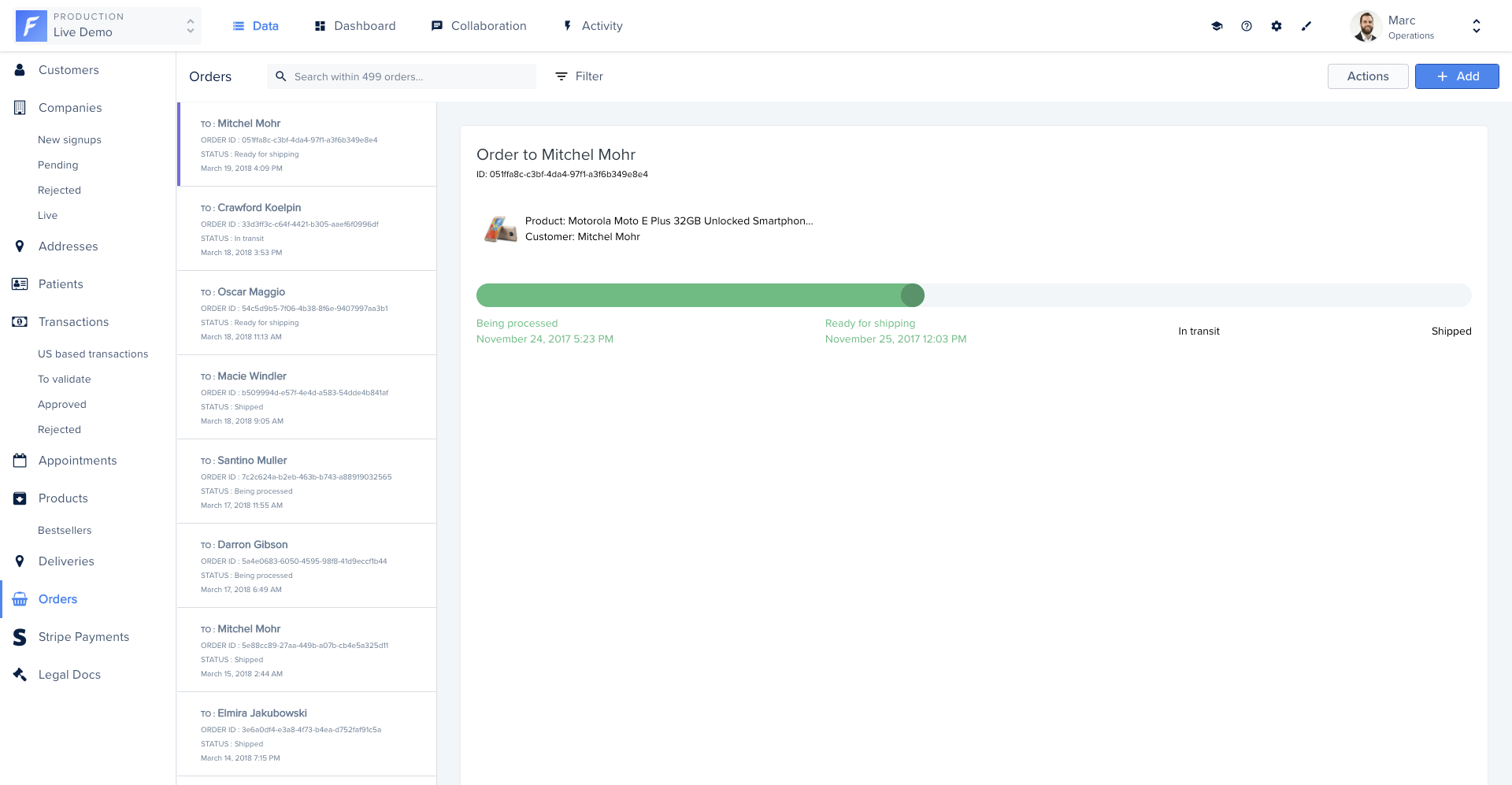
get status() {
switch (this.currentRecord?.get('forest-shipping_status')) {
case 'Being processed': return 'one';
case 'Ready for shipping': return 'two';
case 'In transit': return 'three';
case 'Shipped': return 'four';
default: return null;
}
}
@action
setDefaultCurrentRecord() {
if (!this.currentRecord) {
this.currentRecord = this.args.records.firstObject;
}
}
@action
selectRecord(record) {
this.currentRecord = record;
}
@action
triggerSmartAction(...args) {
return triggerSmartAction(this, ...args);
}
@action
deleteRecords(...args) {
return deleteRecords(this, ...args);
}
}
```
```handlebars title="template.hbs" theme={null}
```js title="component.js" theme={null}
import Component from '@glimmer/component';
import { action } from '@ember/object';
import { tracked } from '@glimmer/tracking';
import { triggerSmartAction, deleteRecords } from 'client/utils/smart-view-utils';
export default class extends Component {
@tracked currentRecord = null;
get status() {
switch (this.currentRecord?.get('forest-shipping_status')) {
case 'Being processed': return 'one';
case 'Ready for shipping': return 'two';
case 'In transit': return 'three';
case 'Shipped': return 'four';
default: return null;
}
}
@action
setDefaultCurrentRecord() {
if (!this.currentRecord) {
this.currentRecord = this.args.records.firstObject;
}
}
@action
selectRecord(record) {
this.currentRecord = record;
}
@action
triggerSmartAction(...args) {
return triggerSmartAction(this, ...args);
}
@action
deleteRecords(...args) {
return deleteRecords(this, ...args);
}
}
```
```handlebars title="template.hbs" theme={null}
order ID: {{record.id}}
status: {{record.forest-shipping_status}}