> ## Documentation Index
> Fetch the complete documentation index at: https://forest-chore-open-api.mintlify.site/llms.txt
> Use this file to discover all available pages before exploring further.
# Smart Fields
### What is a Smart Field?
A field that displays a computed value in your collection.
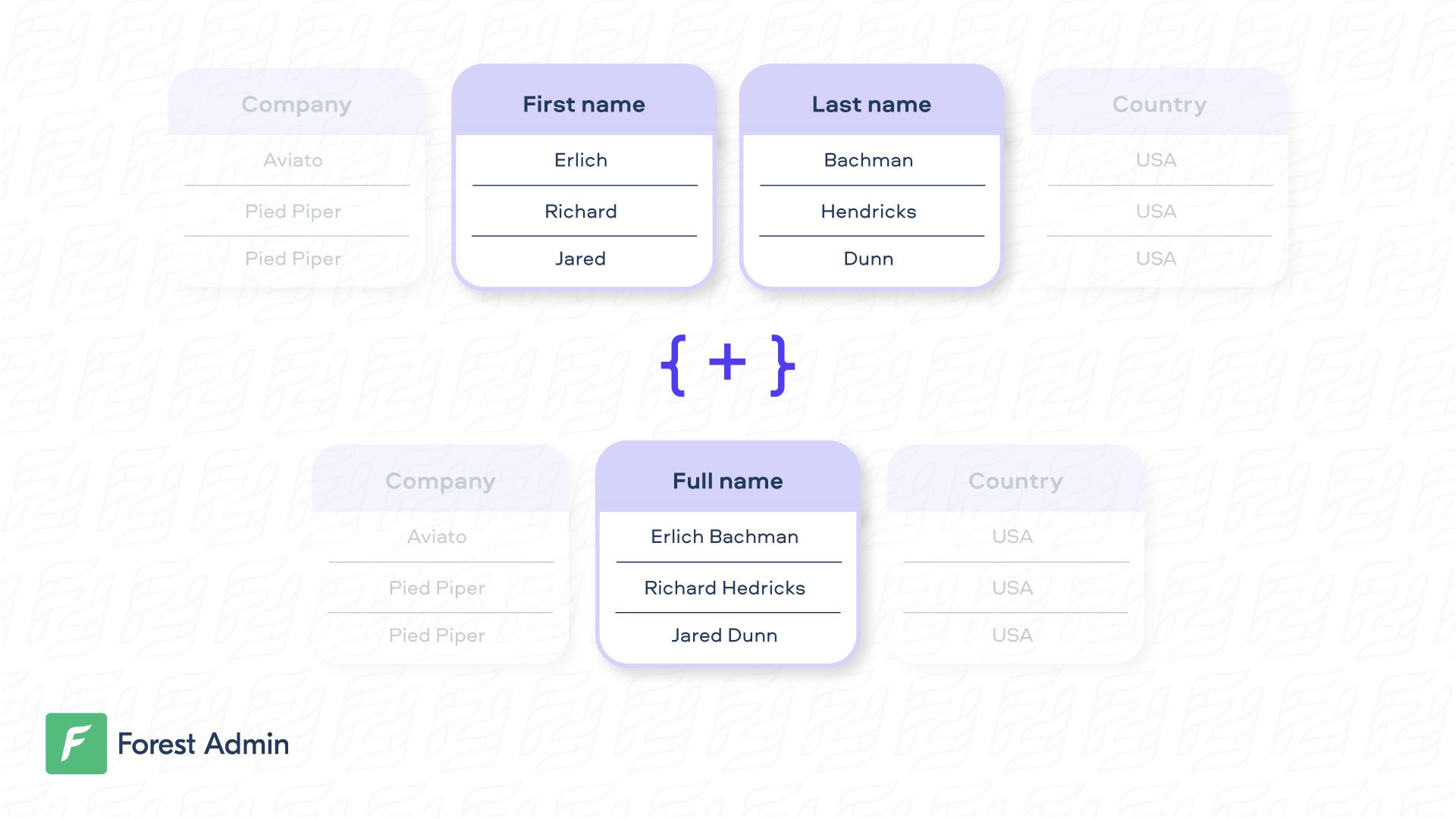 A Smart Field is a column that displays processed-on-the-fly data. It can be as simple as concatenating attributes to make them human friendly, or more complex (e.g. total of orders).
### Creating a Smart Field
On our Live Demo, the very simple Smart Field `fullname` is available on the `Customer` collection.
```ruby theme={null}
class Forest::Customer
include ForestLiana::Collection
collection :Customer
field :fullname, type: 'String' do
"#{object.firstname} #{object.lastname}"
end
end
```
Very often, the business logic behind the Smart Field is more complex and must interact with the database. Here’s an example with the Smart Field `full_address` on the `Customer` collection.
```ruby theme={null}
class Forest::Customer
include ForestLiana::Collection
collection :Customer
field :full_address, type: 'String' do
address = Address.find_by(customer_id: object.id)
"#{address[:address_line_1]} #{address[:address_line_2]} #{address[:address_city]} #{address[:country]}"
end
end
```
On our Live Demo, the very simple Smart Field `fullname` is available on the `Customer` collection.
Ensure the file app/forest/\_\_init\_\_.py exists and contains the import of the previous defined class :
Very often, the business logic behind the Smart Field is more complex and must interact with the database. Here’s an example with the Smart Field `full_address` on the `Customer` collection.
On our Live Demo, the very simple Smart Field `fullname` is available on the `Customer` model.
Very often, the business logic behind the Smart Field is more complex and must interact with the database. Here’s an example with the Smart Field `full_address` on the `Customer` model.
The collection name must be the same as the **model name**.
### Updating a Smart Field
By default, your Smart Field is considered as read-only. If you want to update a Smart Field, you just need to write the logic to “unzip” the data. **Note that the set method should always return the object it’s working on**. In the example hereunder, the `user_params` is returned is returned including only the modified data.
```ruby theme={null}
class Forest::Customer
include ForestLiana::Collection
collection :Customer
set_fullname = lambda do |user_params, fullname|
fullname = fullname.split
user_params[:firstname] = fullname.first
user_params[:lastname] = fullname.last
# Returns a hash of the updated values you want to persist.
user_params
end
field :fullname, type: 'String', set: set_fullname do
"#{object.firstname} #{object.lastname}"
end
end
```
For security reasons, the `fullname` Smart field will remain **read-only**, even after you implement the `set` method. To edit it, disable read-only mode in the field settings.
By default, your Smart Field is considered as read-only. If you want to update a Smart Field, you just need to write the logic to “unzip” the data. **Note that the `set` method should always return the object it’s working on**. In the example hereunder, the `customer` object is returned including only the modified data.
### Searching, Sorting and Filtering on a Smart Field
To perform a search on a Smart Field, you also need to write the logic to “unzip” the data, then the search query which is specific to your zipping. In the example hereunder, the `firstname` and `lastname` are searched separately after having been unzipped.
```ruby theme={null}
class Forest::Customer
include ForestLiana::Collection
collection :Customer
search_fullname = lambda do |query, search|
firstname, lastname = search.split
# Injects your new filter into the WHERE clause.
query.where_clause.send(:predicates)[0] << " OR (firstname = '#{firstname}' AND lastname = '#{lastname}')"
query
end
field :fullname, type: 'String', set: set_fullname, search: search_fullname do
"#{object.firstname} #{object.lastname}"
end
end
```
#### Filtering
This feature is only available on agents version **6.7+** (version **6.2+** for Rails).
To perform a filter on a Smart Field, you need to write the filter query logic, which is specific to your use case.
In the example hereunder, the `fullname` is filtered by checking conditions on the `firstname` and `lastname` depending on the filter operator selected.
```ruby theme={null}
class Forest::Customer
include ForestLiana::Collection
collection :Customer
filter_fullname = lambda do |condition, where|
first_word = condition['value'] && condition['value'].split[0]
second_word = condition['value'] && condition['value'].split[1]
case condition['operator']
when 'equal'
"firstname = '#{first_word}' AND lastname = '#{second_word}'"
when 'ends_with'
if second_word.nil?
"lastname LIKE '%#{first_word}'"
else
"firstname LIKE '%#{first_word}' AND lastname = '#{second_word}'"
end
# ... And so on with the other operators not_equal, starts_with, etc.
end
end
field :fullname, type: 'String', is_read_only: false, is_required: true, is_filterable: true, filter: filter_fullname do
"#{object.firstname} #{object.lastname}"
end
end
```
Make sure you set the option `isFilterable: true` in the field definition of your code. Then, you will be able to toggle the "Filtering enabled" option in the browser, in your **Fields Settings**.
#### Sorting
**Sorting** on a Smart Field is not *natively supported* in Forest. However you can check out those guides:
* [Sort by Smart field](/legacy/ruby-agent/reference-guide/smart-fields/smart-field-examples/sort-by-smart-field)
* [Sort by Smart field that includes value from a belongsTo relationship](/legacy/ruby-agent/reference-guide/smart-fields/smart-field-examples/sort-by-smart-field-that-includes-value-from-a-belongsto-relationship)
### Available Field Options
Here are the list of available options to customize your Smart Field:
| Name | Type | Description |
| ----------- | ---------------- | -------------------------------------------------------------------------------------------------------------------------------------------------------------- |
| field | string | The name of your Smart Field. |
| type | string | Type of your field. Can be `Boolean`, `Date`, `Json`,`Dateonly`, `Enum`, `File`, `Number, ['String']` or `String` . |
| enums | array of strings | (optional) Required only for the `Enum` type. This is where you list all the possible values for your input field. |
| description | string | (optional) Add a description to your field. |
| reference | string | (optional) Configure the Smart Field as a [Smart Relationship](/legacy/ruby-agent/reference-guide/models/relationships/overview#what-is-a-smart-relationship). |
| isReadOnly | boolean | (optional) If `true`, the Smart Field won’t be editable in the browser. Default is `true` if there’s no `set` option declared. |
| isRequired | boolean | (optional) If true, your Smart Field will be set as required in the browser. Default is false. |
You can define a widget for a smart field from the [settings of your collection](https://docs.forestadmin.com/user-guide/collections/customize-your-fields).
### Building Performant Smart Fields
To optimize your smart field performance, we recommend using a mechanism of batching and caching data requests.
Implement them using the DataLoader which is a generic utility to be used as part of your application's data fetching layer to provide a simplified and consistent API over various remote data sources.
#### Smart field declaration
####
A Smart Field is a column that displays processed-on-the-fly data. It can be as simple as concatenating attributes to make them human friendly, or more complex (e.g. total of orders).
### Creating a Smart Field
On our Live Demo, the very simple Smart Field `fullname` is available on the `Customer` collection.
```ruby theme={null}
class Forest::Customer
include ForestLiana::Collection
collection :Customer
field :fullname, type: 'String' do
"#{object.firstname} #{object.lastname}"
end
end
```
Very often, the business logic behind the Smart Field is more complex and must interact with the database. Here’s an example with the Smart Field `full_address` on the `Customer` collection.
```ruby theme={null}
class Forest::Customer
include ForestLiana::Collection
collection :Customer
field :full_address, type: 'String' do
address = Address.find_by(customer_id: object.id)
"#{address[:address_line_1]} #{address[:address_line_2]} #{address[:address_city]} #{address[:country]}"
end
end
```
On our Live Demo, the very simple Smart Field `fullname` is available on the `Customer` collection.
Ensure the file app/forest/\_\_init\_\_.py exists and contains the import of the previous defined class :
Very often, the business logic behind the Smart Field is more complex and must interact with the database. Here’s an example with the Smart Field `full_address` on the `Customer` collection.
On our Live Demo, the very simple Smart Field `fullname` is available on the `Customer` model.
Very often, the business logic behind the Smart Field is more complex and must interact with the database. Here’s an example with the Smart Field `full_address` on the `Customer` model.
The collection name must be the same as the **model name**.
### Updating a Smart Field
By default, your Smart Field is considered as read-only. If you want to update a Smart Field, you just need to write the logic to “unzip” the data. **Note that the set method should always return the object it’s working on**. In the example hereunder, the `user_params` is returned is returned including only the modified data.
```ruby theme={null}
class Forest::Customer
include ForestLiana::Collection
collection :Customer
set_fullname = lambda do |user_params, fullname|
fullname = fullname.split
user_params[:firstname] = fullname.first
user_params[:lastname] = fullname.last
# Returns a hash of the updated values you want to persist.
user_params
end
field :fullname, type: 'String', set: set_fullname do
"#{object.firstname} #{object.lastname}"
end
end
```
For security reasons, the `fullname` Smart field will remain **read-only**, even after you implement the `set` method. To edit it, disable read-only mode in the field settings.
By default, your Smart Field is considered as read-only. If you want to update a Smart Field, you just need to write the logic to “unzip” the data. **Note that the `set` method should always return the object it’s working on**. In the example hereunder, the `customer` object is returned including only the modified data.
### Searching, Sorting and Filtering on a Smart Field
To perform a search on a Smart Field, you also need to write the logic to “unzip” the data, then the search query which is specific to your zipping. In the example hereunder, the `firstname` and `lastname` are searched separately after having been unzipped.
```ruby theme={null}
class Forest::Customer
include ForestLiana::Collection
collection :Customer
search_fullname = lambda do |query, search|
firstname, lastname = search.split
# Injects your new filter into the WHERE clause.
query.where_clause.send(:predicates)[0] << " OR (firstname = '#{firstname}' AND lastname = '#{lastname}')"
query
end
field :fullname, type: 'String', set: set_fullname, search: search_fullname do
"#{object.firstname} #{object.lastname}"
end
end
```
#### Filtering
This feature is only available on agents version **6.7+** (version **6.2+** for Rails).
To perform a filter on a Smart Field, you need to write the filter query logic, which is specific to your use case.
In the example hereunder, the `fullname` is filtered by checking conditions on the `firstname` and `lastname` depending on the filter operator selected.
```ruby theme={null}
class Forest::Customer
include ForestLiana::Collection
collection :Customer
filter_fullname = lambda do |condition, where|
first_word = condition['value'] && condition['value'].split[0]
second_word = condition['value'] && condition['value'].split[1]
case condition['operator']
when 'equal'
"firstname = '#{first_word}' AND lastname = '#{second_word}'"
when 'ends_with'
if second_word.nil?
"lastname LIKE '%#{first_word}'"
else
"firstname LIKE '%#{first_word}' AND lastname = '#{second_word}'"
end
# ... And so on with the other operators not_equal, starts_with, etc.
end
end
field :fullname, type: 'String', is_read_only: false, is_required: true, is_filterable: true, filter: filter_fullname do
"#{object.firstname} #{object.lastname}"
end
end
```
Make sure you set the option `isFilterable: true` in the field definition of your code. Then, you will be able to toggle the "Filtering enabled" option in the browser, in your **Fields Settings**.
#### Sorting
**Sorting** on a Smart Field is not *natively supported* in Forest. However you can check out those guides:
* [Sort by Smart field](/legacy/ruby-agent/reference-guide/smart-fields/smart-field-examples/sort-by-smart-field)
* [Sort by Smart field that includes value from a belongsTo relationship](/legacy/ruby-agent/reference-guide/smart-fields/smart-field-examples/sort-by-smart-field-that-includes-value-from-a-belongsto-relationship)
### Available Field Options
Here are the list of available options to customize your Smart Field:
| Name | Type | Description |
| ----------- | ---------------- | -------------------------------------------------------------------------------------------------------------------------------------------------------------- |
| field | string | The name of your Smart Field. |
| type | string | Type of your field. Can be `Boolean`, `Date`, `Json`,`Dateonly`, `Enum`, `File`, `Number, ['String']` or `String` . |
| enums | array of strings | (optional) Required only for the `Enum` type. This is where you list all the possible values for your input field. |
| description | string | (optional) Add a description to your field. |
| reference | string | (optional) Configure the Smart Field as a [Smart Relationship](/legacy/ruby-agent/reference-guide/models/relationships/overview#what-is-a-smart-relationship). |
| isReadOnly | boolean | (optional) If `true`, the Smart Field won’t be editable in the browser. Default is `true` if there’s no `set` option declared. |
| isRequired | boolean | (optional) If true, your Smart Field will be set as required in the browser. Default is false. |
You can define a widget for a smart field from the [settings of your collection](https://docs.forestadmin.com/user-guide/collections/customize-your-fields).
### Building Performant Smart Fields
To optimize your smart field performance, we recommend using a mechanism of batching and caching data requests.
Implement them using the DataLoader which is a generic utility to be used as part of your application's data fetching layer to provide a simplified and consistent API over various remote data sources.
#### Smart field declaration
####