> ## Documentation Index
> Fetch the complete documentation index at: https://forest-chore-open-api.mintlify.site/llms.txt
> Use this file to discover all available pages before exploring further.
# Enrich your models
> ⚠️ This page is relevant only if you installed Forest directly on a database (SQL/Mongodb). If you installed in a Rails/Django/Laravel app, you manage your models like you normally would.
### Declaring a new model
Whenever you have a new table/collection in your database, you will have to create file to declare it. Here is a **template example** for a `companies` table:
### Declaring a new field in a model
Any new field must be added **manually** within the corresponding model of your `/models` folder.
### Managing nested documents in Mongoose
For a better user experience, flatten nested fields. In v2 see the [Flattener plugin](/product/process/advanced-concepts/plugins/overview).
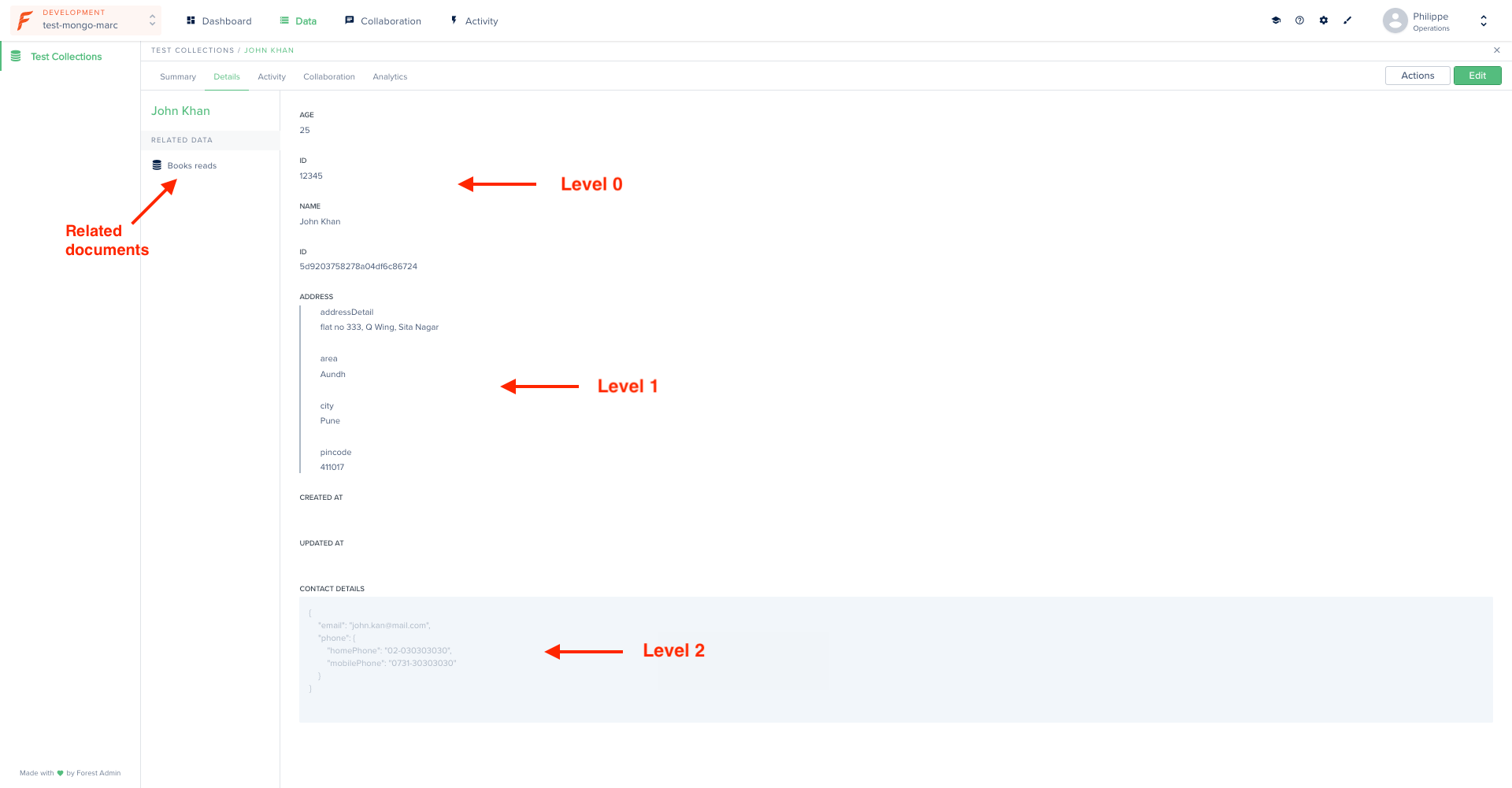
Lumber introspects your data structure recursively, so ***nested fields*** (object in object) are detected any level deep. Your **sub-documents** (array of nested fields) are detected as well.
Conflicting data types will result in the generation of a [mixed](https://mongoosejs.com/docs/schematypes.html#mixed) type field.
The following model...
...will result in the following interface:
 ### Removing a model
By default **all** tables/collections in your database are analyzed by Lumber to generate your models. If you want to exclude some of them to prevent them from appearing in your Forest, check out [this how-to](/legacy/ruby-agent/how-tos/settings/include-exclude-models).
### Adding validation to your models
Validation allows you to keep control over your data's quality and integrity.
If your existing app already has validation conditions, you may - or may not - want to reproduce the same validation conditions in your admin backend's models.
If so, you'll have to do it **manually**, using the below examples.
Depending on your database type, your models will have been generated in *Sequelize* (for SQL databases) or *Mongoose* (for Mongo databases).
###
### Adding a default value to your models
You can choose to add a default value for some fields in your models. As a result, the corresponding fields will be prefilled with their default value in the creation form:
### Adding a hook
Hooks are a powerful mechanism which allow you to automatically **trigger an event** at specific moments in your records lifecycle.
In our case, let's pretend we want to update a `update_count` field every time a record is updated:
### Removing a model
By default **all** tables/collections in your database are analyzed by Lumber to generate your models. If you want to exclude some of them to prevent them from appearing in your Forest, check out [this how-to](/legacy/ruby-agent/how-tos/settings/include-exclude-models).
### Adding validation to your models
Validation allows you to keep control over your data's quality and integrity.
If your existing app already has validation conditions, you may - or may not - want to reproduce the same validation conditions in your admin backend's models.
If so, you'll have to do it **manually**, using the below examples.
Depending on your database type, your models will have been generated in *Sequelize* (for SQL databases) or *Mongoose* (for Mongo databases).
###
### Adding a default value to your models
You can choose to add a default value for some fields in your models. As a result, the corresponding fields will be prefilled with their default value in the creation form:
### Adding a hook
Hooks are a powerful mechanism which allow you to automatically **trigger an event** at specific moments in your records lifecycle.
In our case, let's pretend we want to update a `update_count` field every time a record is updated: