> ## Documentation Index
> Fetch the complete documentation index at: https://forest-chore-open-api.mintlify.site/llms.txt
> Use this file to discover all available pages before exploring further.
# Performance
> Loading performance is key to streamlining your operations. Here are a few steps we recommend taking to ensure your Forest is optimized.
Please find here all the hands-on best practices to keep your admin panel performant. Depending on your user's needs, you might either hide or optimize some fields to limit the number of components, avoid a large datasets display or rework complex logic.
You can display bellow performances improvement tricks in [this video](https://www.youtube.com/watch?v=UC5nH8q5YUI). For any further help to improve admin panel performances, get in touch with [the community](https://community.forestadmin.com).
### Layout optimization
1\. Show only [Smart fields](https://docs.forestadmin.com/documentation/reference-guide/fields/create-and-manage-smart-fields) you absolutely need.
As you can see in the [Loading time benchmark](/legacy/javascript-agents/reference-guide/performance#loading-time-benchmark) below, Smart fields can be quite **costly** in terms of loading performance. Limiting them to those you need is key.
2\. Reduce the number of records per page
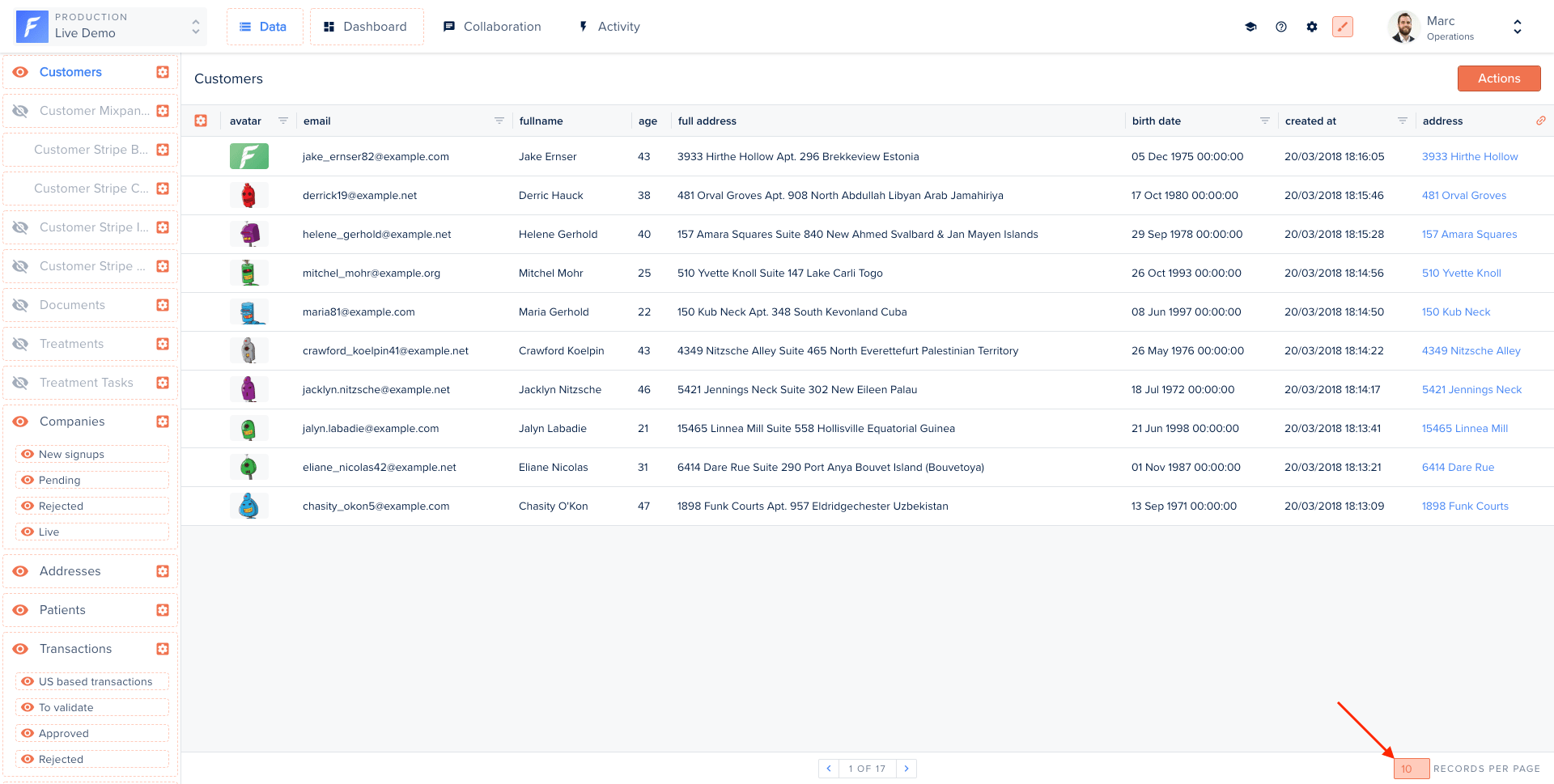 3\. Reduce the number of fields displayed
.png?fit=max&auto=format&n=TmGmEqoffYUVv4Df&q=85&s=eaa67be31669737f0d0efeb811e8a955) You can hide some fields in your table view; this will not prevent you from seeing them in the record details view.
Relationship fields are links to other collection records within your table view:
You can hide some fields in your table view; this will not prevent you from seeing them in the record details view.
Relationship fields are links to other collection records within your table view:
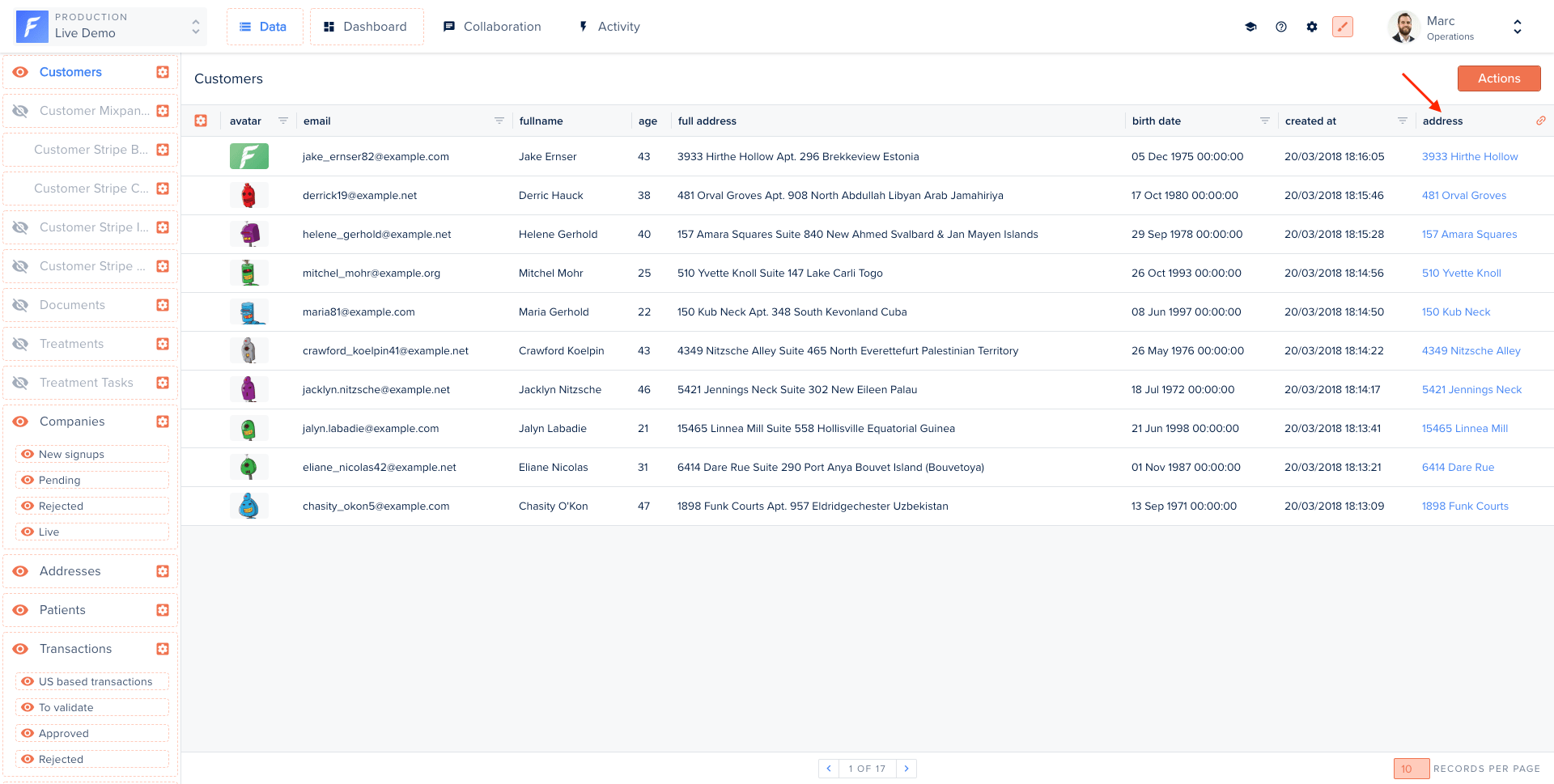 Having Relationship fields can decrease your performance, especially if your tables have a lot of records. Therefore you should display only those you need and use!
### Optimize smart fields performance
To optimize your smart field performances, please check out [this section](/legacy/javascript-agents/reference-guide/smart-fields/overview#createadvancedsmartfield).
### Restrict search on specific fields
Sometimes, searching in all fields is not relevant and may even result in big performance issues. You can restrict your search to specific fields only using the `searchFields` option.
In this example, we configure Forest to only search on the fields `name` and `industry` of our collection `companies`.
```javascript theme={null}
const { collection } = require('forest-express-sequelize');
collection('companies', {
searchFields: ['name', 'industry'],
});
```
In this example, we configure Forest to only search on the fields `name` and `industry` of our collection `companies`.
```javascript theme={null}
const { collection } = require('forest-express-mongoose');
collection('companies', {
searchFields: ['name', 'industry'],
});
```
In this example, we configure Forest to only search on the fields `name` and `industry` of our collection `Company`.
```ruby theme={null}
class Forest::BooksController < ForestLiana::ResourcesController
def count
deactivate_count_response
end
end
```
* adding a route in `app/config/routes.rb` before `mount ForestLiana::Engine => '/forest'`
```ruby theme={null}
namespace :forest do
get '/Book/count' , to: 'books#count'
end
```
..adding the following middleware in settings.py and set the collection(s) to deactivate.
adding a route in `app/routes/web.php`
To disable the count request in the table of a relationship (Related data section):
```javascript theme={null}
router.get(
'/books/:recordId/relationships/companies/count',
deactivateCountMiddleware
);
```
```javascript theme={null}
router.get(
'/books/:recordId/relationships/companies/count',
deactivateCountMiddleware
);
```
```ruby theme={null}
class Forest::BookCompaniesController < ForestLiana::AssociationsController
def count
if (params[:search])
params[:collection] = 'Book'
params[:association_name] = 'company'
super
else
deactivate_count_response
end
end
end
```
```ruby theme={null}
namespace :forest do
get '/Book/:id/relationships/companies/count' , to: 'book_companies#count'
end
```
Furthermore, if you want to disable on all relationships at once:
```python theme={null}
class CustomDeactivateCountMiddleware(DeactivateCountMiddleware):
def is_deactivated(self, request, view_func, *args, **kwargs):
is_deactivated = super().is_deactivated(request, view_func, *args, **kwargs)
return is_deactivated and 'search' not in request.GET
```
```python theme={null}
MIDDLEWARE = [
'myproject.myapp.middlewares.CustomDeactivateCountMiddleware',
# ...
]
# To deactivate the count on /apps_books/count if there is no search argument
FOREST = {
# ...,
DEACTIVATED_COUNT = [
'apps_books', # apps_model
],
# ...
}
```
One more example: you may want to deactivate the pagination count request for a specific team:
```javascript theme={null}
router.get('/books/count', (request, response, next) => {
// Count is deactivated for the Operations team
if (request.user.team === 'Operations') {
deactivateCountMiddleware(request, response);
// Count is made for all other teams
} else {
next();
}
});
```
```javascript theme={null}
router.get('/books/count', (request, response, next) => {
// Count is deactivated for the Operations team
if (request.user.team === 'Operations') {
deactivateCountMiddleware(request, response);
// Count is made for all other teams
} else {
next();
}
});
```
```ruby theme={null}
class Forest::BooksController < ForestLiana::ResourcesController
def count
if forest_user['team'] == 'Operations'
deactivate_count_response
else
params[:collection] = 'Book'
super
end
end
end
```
### Database Indexing
**Indexes** are a powerful tool used in the background of a database to speed up querying. It power queries by providing a method to quickly lookup the requested data. As Forest generates SQL queries to fetch your data, creating indexes can improve the query response time.
5\. Index the Primary and Unique Key Columns
\
The syntax for creating an index will vary depending on the database. However, the syntax typically includes a `CREATE` keyword followed by the `INDEX` keyword and the name we’d like to use for the index. Next should come the `ON` keyword followed by the name of the table that has the data we’d like to quickly access. Finally, the last part of the statement should be the name(s) of the columns to be indexed.
```
CREATE INDEX ON (column1, column2, ...)
```
For example, if we would like to index phone numbers from a `customers` table, we could use the following statement:
```
CREATE INDEX customers_by_phoneON customers (phone_number)
```
The users cannot see the indexes, they are just used to speed up searches/queries.
6\. Index the Foreign Key Columns
Foreign key columns should be indexed if they are used intensively in Smart fields. In the table below, you can see how drastically it reduces the loading time of the page.
Updating a table with indexes takes more time than updating a table without (because the indexes also need an update). So, only create indexes on columns that will be frequently searched against.
### Loading time benchmark
Below is the outcome of a performance test on page load time of the Table view. It highlights the *importance* of **using indexes** and **limiting the number of columns and lines**.
Having Relationship fields can decrease your performance, especially if your tables have a lot of records. Therefore you should display only those you need and use!
### Optimize smart fields performance
To optimize your smart field performances, please check out [this section](/legacy/javascript-agents/reference-guide/smart-fields/overview#createadvancedsmartfield).
### Restrict search on specific fields
Sometimes, searching in all fields is not relevant and may even result in big performance issues. You can restrict your search to specific fields only using the `searchFields` option.
In this example, we configure Forest to only search on the fields `name` and `industry` of our collection `companies`.
```javascript theme={null}
const { collection } = require('forest-express-sequelize');
collection('companies', {
searchFields: ['name', 'industry'],
});
```
In this example, we configure Forest to only search on the fields `name` and `industry` of our collection `companies`.
```javascript theme={null}
const { collection } = require('forest-express-mongoose');
collection('companies', {
searchFields: ['name', 'industry'],
});
```
In this example, we configure Forest to only search on the fields `name` and `industry` of our collection `Company`.
```ruby theme={null}
class Forest::BooksController < ForestLiana::ResourcesController
def count
deactivate_count_response
end
end
```
* adding a route in `app/config/routes.rb` before `mount ForestLiana::Engine => '/forest'`
```ruby theme={null}
namespace :forest do
get '/Book/count' , to: 'books#count'
end
```
..adding the following middleware in settings.py and set the collection(s) to deactivate.
adding a route in `app/routes/web.php`
To disable the count request in the table of a relationship (Related data section):
```javascript theme={null}
router.get(
'/books/:recordId/relationships/companies/count',
deactivateCountMiddleware
);
```
```javascript theme={null}
router.get(
'/books/:recordId/relationships/companies/count',
deactivateCountMiddleware
);
```
```ruby theme={null}
class Forest::BookCompaniesController < ForestLiana::AssociationsController
def count
if (params[:search])
params[:collection] = 'Book'
params[:association_name] = 'company'
super
else
deactivate_count_response
end
end
end
```
```ruby theme={null}
namespace :forest do
get '/Book/:id/relationships/companies/count' , to: 'book_companies#count'
end
```
Furthermore, if you want to disable on all relationships at once:
```python theme={null}
class CustomDeactivateCountMiddleware(DeactivateCountMiddleware):
def is_deactivated(self, request, view_func, *args, **kwargs):
is_deactivated = super().is_deactivated(request, view_func, *args, **kwargs)
return is_deactivated and 'search' not in request.GET
```
```python theme={null}
MIDDLEWARE = [
'myproject.myapp.middlewares.CustomDeactivateCountMiddleware',
# ...
]
# To deactivate the count on /apps_books/count if there is no search argument
FOREST = {
# ...,
DEACTIVATED_COUNT = [
'apps_books', # apps_model
],
# ...
}
```
One more example: you may want to deactivate the pagination count request for a specific team:
```javascript theme={null}
router.get('/books/count', (request, response, next) => {
// Count is deactivated for the Operations team
if (request.user.team === 'Operations') {
deactivateCountMiddleware(request, response);
// Count is made for all other teams
} else {
next();
}
});
```
```javascript theme={null}
router.get('/books/count', (request, response, next) => {
// Count is deactivated for the Operations team
if (request.user.team === 'Operations') {
deactivateCountMiddleware(request, response);
// Count is made for all other teams
} else {
next();
}
});
```
```ruby theme={null}
class Forest::BooksController < ForestLiana::ResourcesController
def count
if forest_user['team'] == 'Operations'
deactivate_count_response
else
params[:collection] = 'Book'
super
end
end
end
```
### Database Indexing
**Indexes** are a powerful tool used in the background of a database to speed up querying. It power queries by providing a method to quickly lookup the requested data. As Forest generates SQL queries to fetch your data, creating indexes can improve the query response time.
5\. Index the Primary and Unique Key Columns
\
The syntax for creating an index will vary depending on the database. However, the syntax typically includes a `CREATE` keyword followed by the `INDEX` keyword and the name we’d like to use for the index. Next should come the `ON` keyword followed by the name of the table that has the data we’d like to quickly access. Finally, the last part of the statement should be the name(s) of the columns to be indexed.
```
CREATE INDEX ON (column1, column2, ...)
```
For example, if we would like to index phone numbers from a `customers` table, we could use the following statement:
```
CREATE INDEX customers_by_phoneON customers (phone_number)
```
The users cannot see the indexes, they are just used to speed up searches/queries.
6\. Index the Foreign Key Columns
Foreign key columns should be indexed if they are used intensively in Smart fields. In the table below, you can see how drastically it reduces the loading time of the page.
Updating a table with indexes takes more time than updating a table without (because the indexes also need an update). So, only create indexes on columns that will be frequently searched against.
### Loading time benchmark
Below is the outcome of a performance test on page load time of the Table view. It highlights the *importance* of **using indexes** and **limiting the number of columns and lines**.
.png?fit=max&auto=format&n=l9oWVTFSA2iV8NAX&q=85&s=03ccbd733e90d7b98f1b022e66190ff1)