> ## Documentation Index
> Fetch the complete documentation index at: https://forest-chore-open-api.mintlify.site/llms.txt
> Use this file to discover all available pages before exploring further.
# Security & Privacy Architecture
> Understand how Forest protects your data with privacy-first architecture and robust security measures
Forest is built with security and privacy at its core. Your data never transits through Forest servers, and you maintain complete control over your infrastructure and access policies.
## Data privacy
### Private by design
Forest implements a **privacy-first architecture** where your data flows directly between your Back-end and user browsers, never passing through Forest servers.
**How it works:**
When users access the Forest UI, their browser establishes two separate connections:
1. **Forest servers:** Retrieves layout configuration, UI settings, and metadata
2. **Your Back-end:** Retrieves actual data from your database
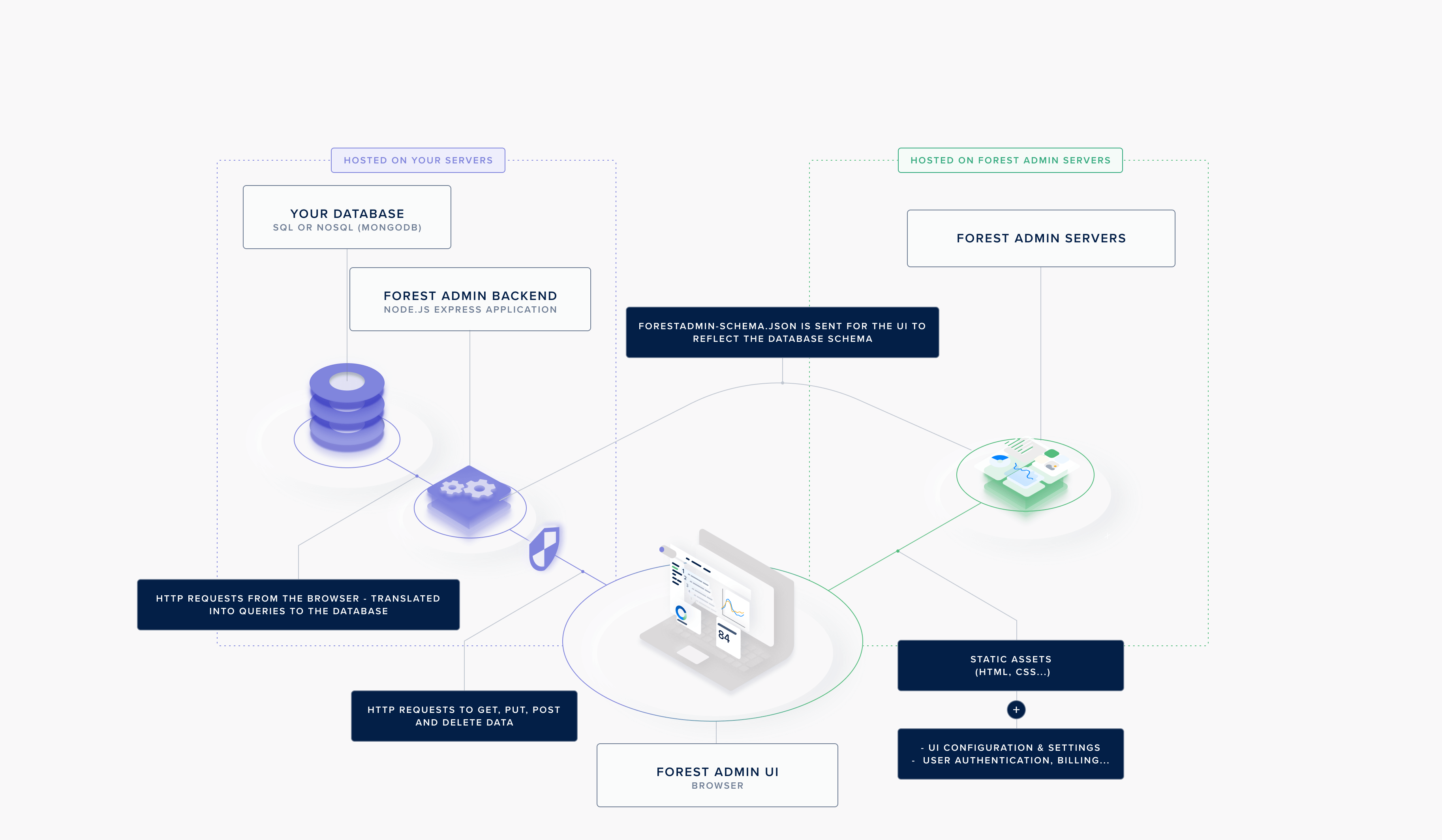 **What Forest sees:**
* UI layouts and configurations
* User authentication metadata (email, role, permissions)
* API request logs (endpoints called, timestamps)
**What Forest never sees:**
* Your actual data (customer records, transactions, etc.)
* Database credentials
* Your `FOREST_AUTH_SECRET`
This architecture ensures your data remains within your infrastructure at all times.
### No third-party tracking
**What Forest sees:**
* UI layouts and configurations
* User authentication metadata (email, role, permissions)
* API request logs (endpoints called, timestamps)
**What Forest never sees:**
* Your actual data (customer records, transactions, etc.)
* Database credentials
* Your `FOREST_AUTH_SECRET`
This architecture ensures your data remains within your infrastructure at all times.
### No third-party tracking
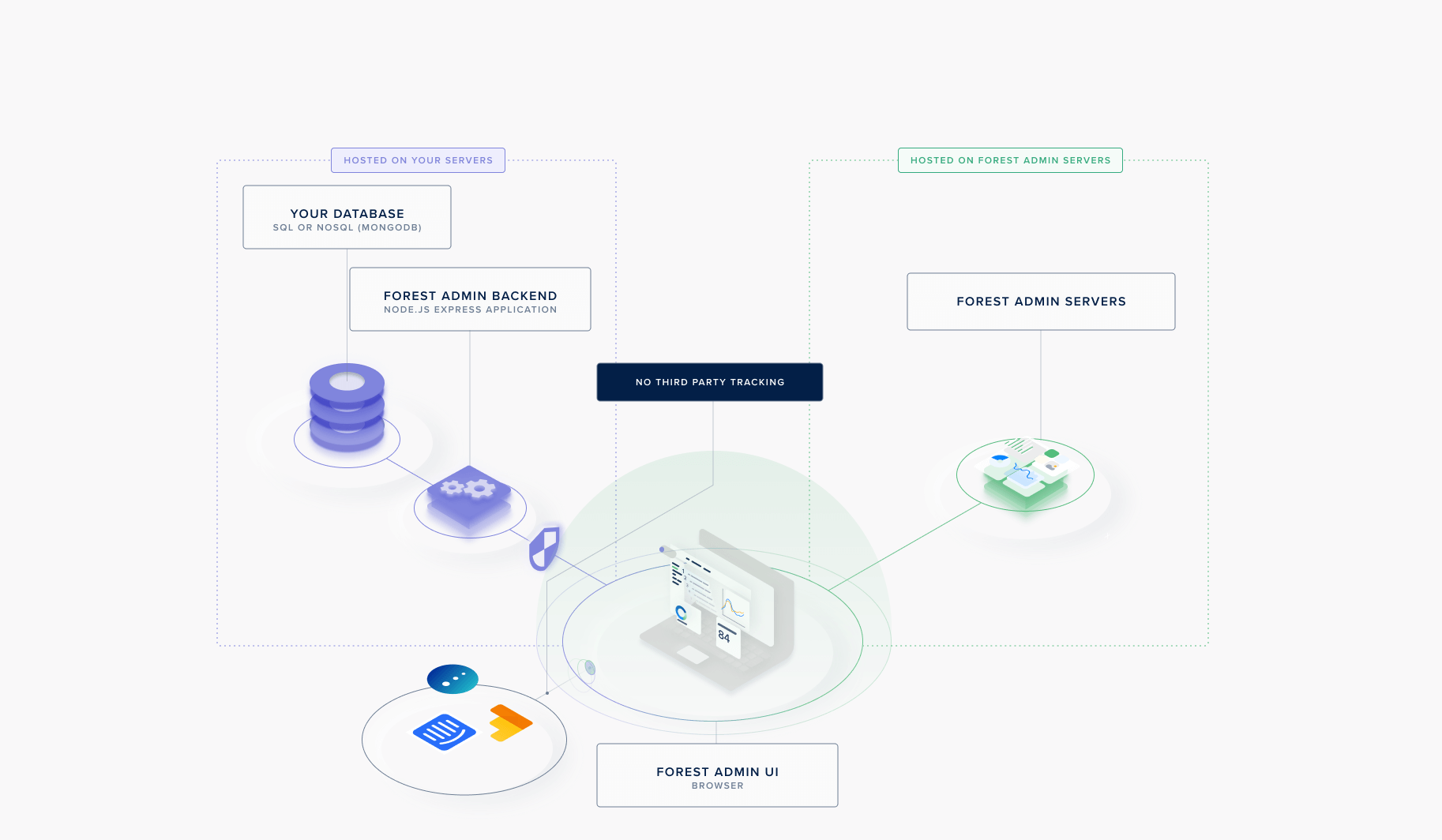 Forest guarantees data privacy across all plan levels:
* **No data sharing:** Your data is never sold or shared with third parties
* **No third-party analytics on data:** Forest doesn't track or analyze your business data
* **Optional tracking control:** Organizations can disable third-party vendors that might track activity metadata from browsers
## Security measures
### Token-based authentication
Forest uses a **dual-token authentication system** to secure both UI access and Back-end communication.
Forest guarantees data privacy across all plan levels:
* **No data sharing:** Your data is never sold or shared with third parties
* **No third-party analytics on data:** Forest doesn't track or analyze your business data
* **Optional tracking control:** Organizations can disable third-party vendors that might track activity metadata from browsers
## Security measures
### Token-based authentication
Forest uses a **dual-token authentication system** to secure both UI access and Back-end communication.
 #### FOREST\_ENV\_SECRET
Authenticates requests between your Back-end and Forest servers.
**Purpose:**
* Links your Back-end to your Forest project
* Authenticates layout and configuration requests
* Required for all architectures (Cloud, Self-Hosted, On-Premise)
**Security notes:**
* Generated by Forest
* Unique per environment (development, staging, production)
* Should be stored as an environment variable
```bash .env theme={null}
FOREST_ENV_SECRET=1234567890abcdef1234567890abcdef1234567890abcdef
```
Never commit `FOREST_ENV_SECRET` to version control. Always use environment variables or secret management tools.
#### FOREST\_AUTH\_SECRET
Authenticates requests between user browsers and your Back-end (Self-Hosted and On-Premise only).
**Purpose:**
* Signs JWT tokens for user authentication
* Validates requests to your Back-end
* **Your choice** - Forest never knows this secret
**Security notes:**
* Generated by you (not Forest)
* Should be at least 32 characters long
* Unique per environment
* Used only in Self-Hosted and On-Premise architectures
```bash Generate a secure secret theme={null}
# Using Node.js
node -e "console.log(require('crypto').randomBytes(32).toString('hex'))"
# Using OpenSSL
openssl rand -hex 32
```
```bash .env theme={null}
FOREST_AUTH_SECRET=your-secure-random-string-at-least-32-characters-long
```
**Cloud architecture:** `FOREST_AUTH_SECRET` is not needed because authentication is handled by Forest servers. Your data still flows directly from your Back-end to browsers without passing through Forest.
### JWT token structure
Both tokens are JSON Web Tokens (JWT) containing user context:
#### FOREST\_ENV\_SECRET
Authenticates requests between your Back-end and Forest servers.
**Purpose:**
* Links your Back-end to your Forest project
* Authenticates layout and configuration requests
* Required for all architectures (Cloud, Self-Hosted, On-Premise)
**Security notes:**
* Generated by Forest
* Unique per environment (development, staging, production)
* Should be stored as an environment variable
```bash .env theme={null}
FOREST_ENV_SECRET=1234567890abcdef1234567890abcdef1234567890abcdef
```
Never commit `FOREST_ENV_SECRET` to version control. Always use environment variables or secret management tools.
#### FOREST\_AUTH\_SECRET
Authenticates requests between user browsers and your Back-end (Self-Hosted and On-Premise only).
**Purpose:**
* Signs JWT tokens for user authentication
* Validates requests to your Back-end
* **Your choice** - Forest never knows this secret
**Security notes:**
* Generated by you (not Forest)
* Should be at least 32 characters long
* Unique per environment
* Used only in Self-Hosted and On-Premise architectures
```bash Generate a secure secret theme={null}
# Using Node.js
node -e "console.log(require('crypto').randomBytes(32).toString('hex'))"
# Using OpenSSL
openssl rand -hex 32
```
```bash .env theme={null}
FOREST_AUTH_SECRET=your-secure-random-string-at-least-32-characters-long
```
**Cloud architecture:** `FOREST_AUTH_SECRET` is not needed because authentication is handled by Forest servers. Your data still flows directly from your Back-end to browsers without passing through Forest.
### JWT token structure
Both tokens are JSON Web Tokens (JWT) containing user context:
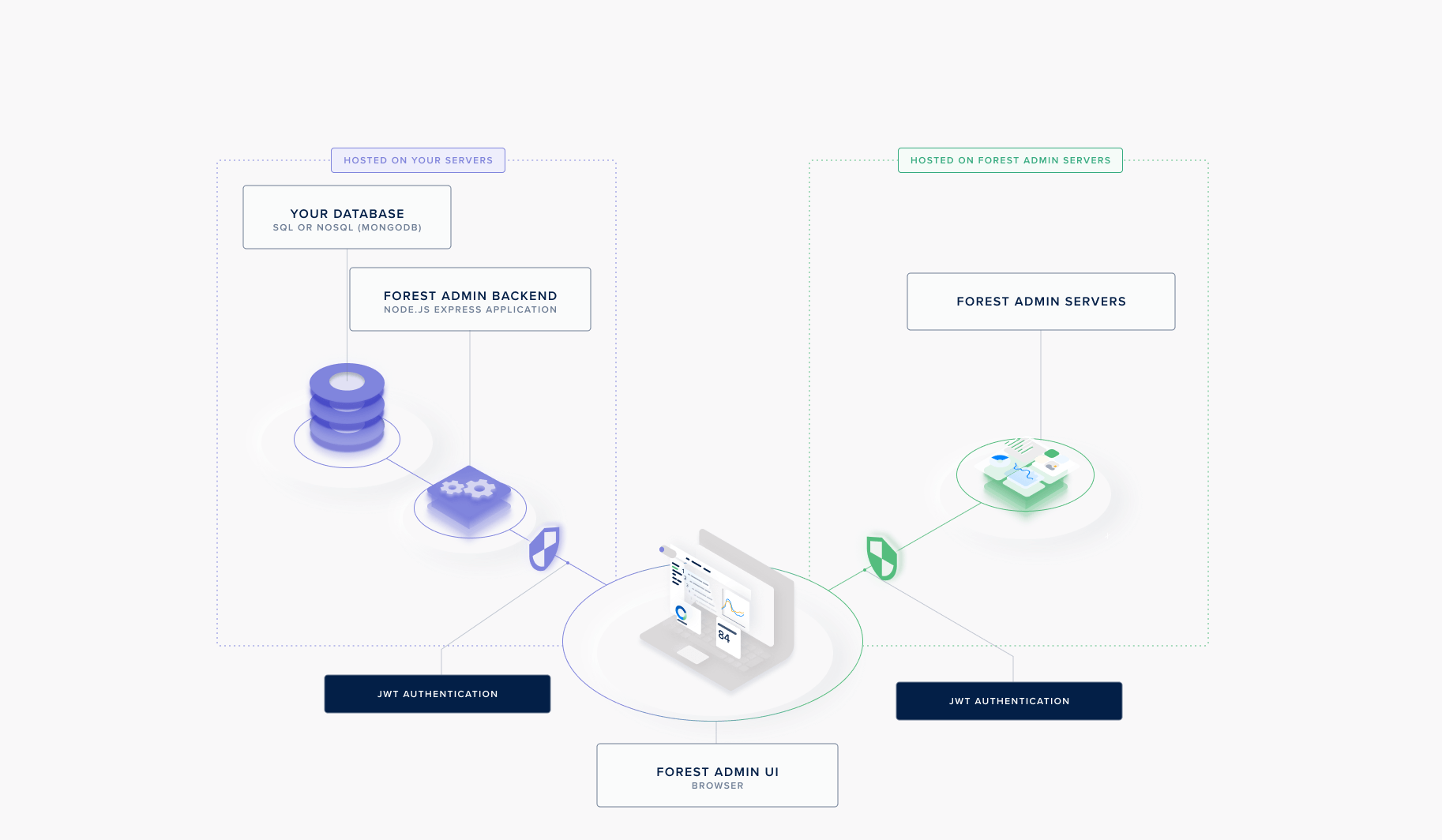 **Token payload includes:**
* User ID
* Email
* Full name
* Role
* Team
* Tags
* Permissions
**Use cases for token data:**
* Custom authorization logic in your Back-end
* Audit logging
* Dynamic filtering based on user context
* Integration with your internal systems
```javascript Node.js - Access user context theme={null}
agent.customizeCollection('orders', collection => {
collection.addHook('Before', 'List', async (context) => {
const { email, role } = context.caller;
// Custom logic based on user context
if (role !== 'admin') {
context.filter = { user_email: email };
}
});
});
```
```ruby Ruby - Access user context theme={null}
collection.add_hook(:Before, :List) do |context|
email = context.caller.email
role = context.caller.role
# Custom logic based on user context
unless role == 'admin'
context.filter = { user_email: email }
end
end
```
### Infrastructure flexibility
You maintain **complete control** over your Back-end deployment:
**Token payload includes:**
* User ID
* Email
* Full name
* Role
* Team
* Tags
* Permissions
**Use cases for token data:**
* Custom authorization logic in your Back-end
* Audit logging
* Dynamic filtering based on user context
* Integration with your internal systems
```javascript Node.js - Access user context theme={null}
agent.customizeCollection('orders', collection => {
collection.addHook('Before', 'List', async (context) => {
const { email, role } = context.caller;
// Custom logic based on user context
if (role !== 'admin') {
context.filter = { user_email: email };
}
});
});
```
```ruby Ruby - Access user context theme={null}
collection.add_hook(:Before, :List) do |context|
email = context.caller.email
role = context.caller.role
# Custom logic based on user context
unless role == 'admin'
context.filter = { user_email: email }
end
end
```
### Infrastructure flexibility
You maintain **complete control** over your Back-end deployment:
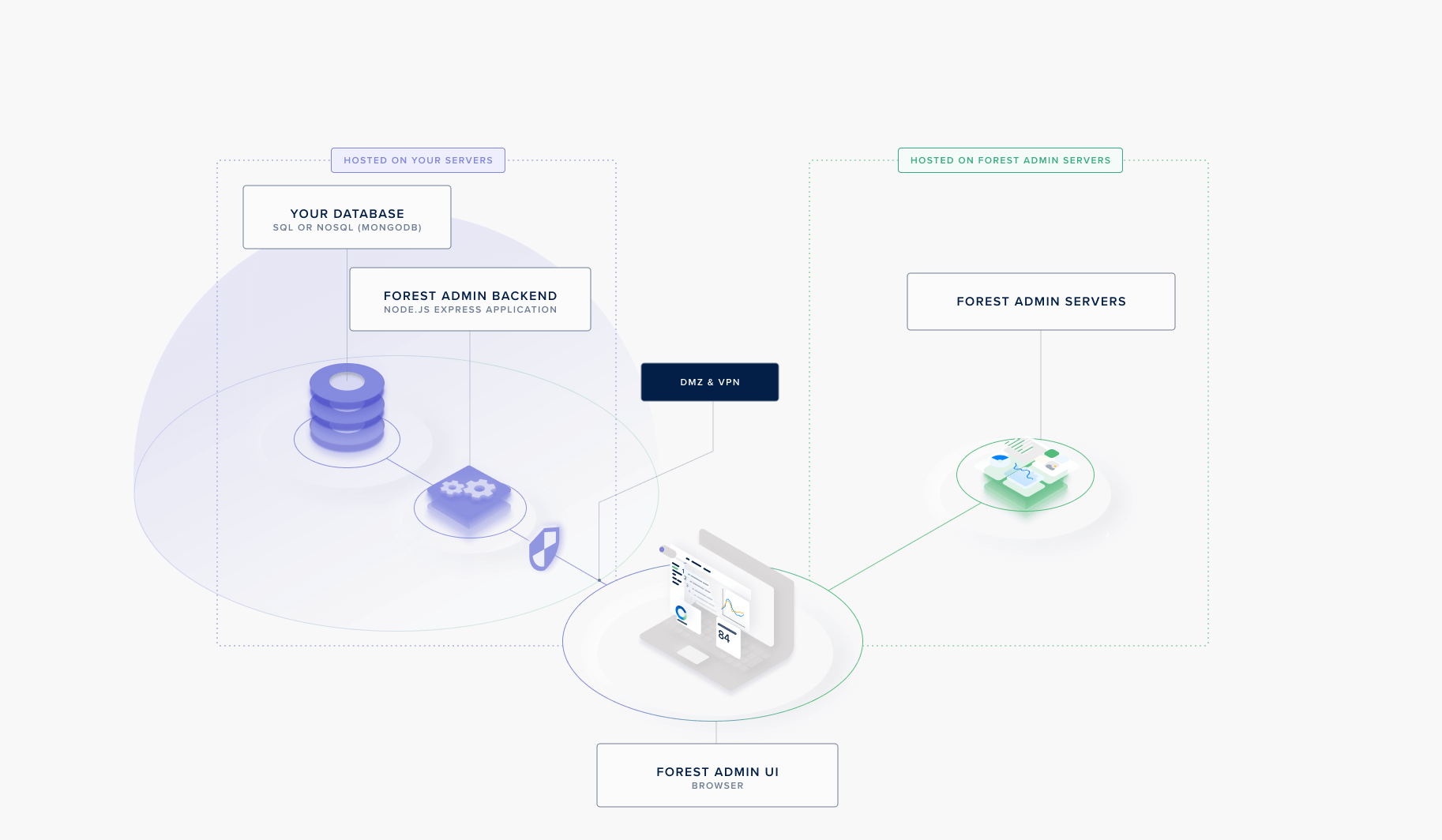 **Deployment options:**
* **DMZ (Demilitarized Zone):** Deploy Back-end in isolated network segment
* **VPN:** Require VPN connection to access Back-end
* **Private Cloud:** Deploy within your private cloud infrastructure
* **On-Premise:** Keep everything within your data center
**Network security:**
* Configure firewall rules
* Set up network segmentation
* Implement reverse proxies
* Use TLS/SSL for all connections
**Best practice:** Deploy your Back-end behind a VPN or firewall to add an additional layer of security. Even if an attacker obtains valid credentials, they would still need network access to reach your Agent.
### HTTPS/TLS encryption
All communication is encrypted:
* **Browser ↔ Forest:** HTTPS with TLS 1.2+
* **Browser ↔ Your Back-end:** HTTPS (you configure)
* **Back-end ↔ Forest:** HTTPS with TLS 1.2+
Always deploy your Back-end with HTTPS enabled in production. Never use HTTP for sensitive data.
**Deployment options:**
* **DMZ (Demilitarized Zone):** Deploy Back-end in isolated network segment
* **VPN:** Require VPN connection to access Back-end
* **Private Cloud:** Deploy within your private cloud infrastructure
* **On-Premise:** Keep everything within your data center
**Network security:**
* Configure firewall rules
* Set up network segmentation
* Implement reverse proxies
* Use TLS/SSL for all connections
**Best practice:** Deploy your Back-end behind a VPN or firewall to add an additional layer of security. Even if an attacker obtains valid credentials, they would still need network access to reach your Agent.
### HTTPS/TLS encryption
All communication is encrypted:
* **Browser ↔ Forest:** HTTPS with TLS 1.2+
* **Browser ↔ Your Back-end:** HTTPS (you configure)
* **Back-end ↔ Forest:** HTTPS with TLS 1.2+
Always deploy your Back-end with HTTPS enabled in production. Never use HTTP for sensitive data.