> ## Documentation Index
> Fetch the complete documentation index at: https://forest-chore-open-api.mintlify.site/llms.txt
> Use this file to discover all available pages before exploring further.
# Replication
> Build custom datasources that maintain a local cache of external data for better performance
Replication datasources are only available for Node.js.
The replication strategy maintains a copy of target API data in an internal cache controlled by your back-end, rather than querying the API in real-time.
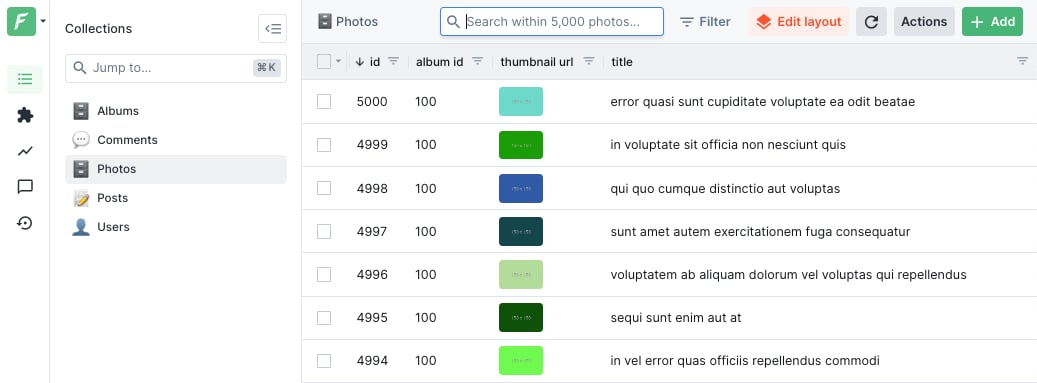 ## Overview
### Key advantages
* **No query translation**: No query translation logic required
* **Performant**: Eliminates synchronous network calls to the target API
* **Feature-complete**: Charts, filtering, and search work out of the box
* **Flexible**: Implement custom logic for fetching target API data
* **Robust**: Recover bad states by reconstructing the replica from scratch
### Minimal implementation
```javascript Node.js theme={null}
const { createReplicaDataSource } = require('@forestadmin/datasource-replica');
const axios = require('axios');
const myCustomDataSource = createReplicaDataSource({
pullDumpHandler: async () => {
const url = 'https://jsonplaceholder.typicode.com';
const collections = ['posts', 'comments', 'albums', 'photos', 'users'];
const entries = [];
for (const collection of collections) {
const response = await axios.get(`${url}/${collection}`);
entries.push(...response.data.map(record => ({ collection, record })));
}
return { more: false, entries };
},
});
agent.addDatasource(myCustomDataSource);
```
This basic implementation fetches all records at startup but doesn't update them afterward.
### Known limitations & solutions
| Limitation | Solution |
| ---------------------------------------------------- | ---------------------------------- |
| Full data dump required at each startup | Implement persistent cache |
| Empty collections and foreign keys not auto-detected | Provide explicit schema definition |
| Data never updates after initial import | Implement update handlers |
| Read-only data | Implement write handlers |
| Nested fields and arrays in API responses | Use record flattener utility |
## Persistent cache
The Forest Node.js back-end uses a SQL database as its underlying cache mechanism. By default, an in-memory SQLite database is used.
### Limitations of in-memory cache
The default in-memory approach presents two main challenges:
1. **Extended startup time**: The back-end must re-fetch all data from the target API on each restart
2. **High memory consumption**: All data remains in memory, which becomes problematic for large datasets
### When to use persistent cache
Depending on which API you are targeting, it may be absolutely fine to use an in-memory cache for smaller datasets. However, larger systems like CRMs or databases containing millions of records benefit significantly from persistent storage.
### Cache initialization
Forest will automatically detect when the schema of the tables in the caching database does not match the schema of the target API. When mismatches occur, tables and indexes are dropped, recreated, and repopulated from the target API.
### Configuration options
* **`cacheInto`**: Accepts a connection string or configuration object for the SQL connector
* **`cacheNamespace`**: Prefixes table names, useful for sharing databases or running multiple replicas
**Important:** No locking mechanism currently exists for concurrent writes when multiple back-end instances share the same cache configuration.
### SQLite file example
```javascript Node.js theme={null}
const myCustomDataSource = createReplicaDataSource({
cacheInto: 'sqlite:/tmp/my-cache.db',
pullDumpHandler: async () => {
return { more: false, entries: [] };
},
});
```
### PostgreSQL example
```javascript Node.js theme={null}
const myCustomDataSource = createReplicaDataSource({
cacheInto: {
uri: 'postgres://xxxx:[email protected]/neondb',
sslMode: 'verify',
},
cacheNamespace: 'my-custom-data-source',
pullDumpHandler: async () => {
return { more: false, entries: [] };
},
});
```
## Updating the replica
Real-world scenarios require keeping the Forest back-end to display up-to-date data.
### Three update methods
Use these approaches independently or combine them:
1. **Scheduled rebuilds** - Refetch all records periodically
2. **Change polling** - Uses Forest events to detect modifications
3. **Change pushing** - Leverages target API events via webhooks
## Overview
### Key advantages
* **No query translation**: No query translation logic required
* **Performant**: Eliminates synchronous network calls to the target API
* **Feature-complete**: Charts, filtering, and search work out of the box
* **Flexible**: Implement custom logic for fetching target API data
* **Robust**: Recover bad states by reconstructing the replica from scratch
### Minimal implementation
```javascript Node.js theme={null}
const { createReplicaDataSource } = require('@forestadmin/datasource-replica');
const axios = require('axios');
const myCustomDataSource = createReplicaDataSource({
pullDumpHandler: async () => {
const url = 'https://jsonplaceholder.typicode.com';
const collections = ['posts', 'comments', 'albums', 'photos', 'users'];
const entries = [];
for (const collection of collections) {
const response = await axios.get(`${url}/${collection}`);
entries.push(...response.data.map(record => ({ collection, record })));
}
return { more: false, entries };
},
});
agent.addDatasource(myCustomDataSource);
```
This basic implementation fetches all records at startup but doesn't update them afterward.
### Known limitations & solutions
| Limitation | Solution |
| ---------------------------------------------------- | ---------------------------------- |
| Full data dump required at each startup | Implement persistent cache |
| Empty collections and foreign keys not auto-detected | Provide explicit schema definition |
| Data never updates after initial import | Implement update handlers |
| Read-only data | Implement write handlers |
| Nested fields and arrays in API responses | Use record flattener utility |
## Persistent cache
The Forest Node.js back-end uses a SQL database as its underlying cache mechanism. By default, an in-memory SQLite database is used.
### Limitations of in-memory cache
The default in-memory approach presents two main challenges:
1. **Extended startup time**: The back-end must re-fetch all data from the target API on each restart
2. **High memory consumption**: All data remains in memory, which becomes problematic for large datasets
### When to use persistent cache
Depending on which API you are targeting, it may be absolutely fine to use an in-memory cache for smaller datasets. However, larger systems like CRMs or databases containing millions of records benefit significantly from persistent storage.
### Cache initialization
Forest will automatically detect when the schema of the tables in the caching database does not match the schema of the target API. When mismatches occur, tables and indexes are dropped, recreated, and repopulated from the target API.
### Configuration options
* **`cacheInto`**: Accepts a connection string or configuration object for the SQL connector
* **`cacheNamespace`**: Prefixes table names, useful for sharing databases or running multiple replicas
**Important:** No locking mechanism currently exists for concurrent writes when multiple back-end instances share the same cache configuration.
### SQLite file example
```javascript Node.js theme={null}
const myCustomDataSource = createReplicaDataSource({
cacheInto: 'sqlite:/tmp/my-cache.db',
pullDumpHandler: async () => {
return { more: false, entries: [] };
},
});
```
### PostgreSQL example
```javascript Node.js theme={null}
const myCustomDataSource = createReplicaDataSource({
cacheInto: {
uri: 'postgres://xxxx:[email protected]/neondb',
sslMode: 'verify',
},
cacheNamespace: 'my-custom-data-source',
pullDumpHandler: async () => {
return { more: false, entries: [] };
},
});
```
## Updating the replica
Real-world scenarios require keeping the Forest back-end to display up-to-date data.
### Three update methods
Use these approaches independently or combine them:
1. **Scheduled rebuilds** - Refetch all records periodically
2. **Change polling** - Uses Forest events to detect modifications
3. **Change pushing** - Leverages target API events via webhooks
 ## Scheduled rebuilds
Scheduled rebuilds represent the simplest approach for updating replica data by fetching all records from a target API at regular intervals. This method works with any API but is less efficient for large datasets since it requires fetching all records regardless of changes.
### Configuration options
**`pullDumpOnRestart`**: When set to `true`, data fetches on each back-end startup. This is always enabled for default in-memory cache implementations.
**`pullDumpOnSchedule`**: Accepts cron-like schedule patterns for periodic updates. For example: `['0 0 0 * * *', '0 30 18 * * *']` triggers daily at midnight and 6:30 PM.
### Schedule syntax
The system uses the croner NPM package for schedule parsing with this format:
```
┌─ second (0-59)
│ ┌─ minute (0-59)
│ │ ┌─ hour (0-23)
│ │ │ ┌─ day of month (1-31)
│ │ │ │ ┌─ month (1-12)
│ │ │ │ │ ┌─ day of week (0-6)
* * * * * *
```
Common examples:
* `* * * * * *` - Every second
* `0 * * * * *` - Every minute
* `0 0 9 * * 1` - Mondays at 9am
### Handler implementation
The `pullDumpHandler` returns entries for import and supports pagination. The request object provides `previousDumpState` (for change detection), `cache` access, and `reasons` (startup/schedule triggers).
The response object specifies entries to import, pagination via `more` flag, and state persistence through `nextDumpState` and `nextDeltaState` fields.
**Key advantage:** Old data remains available to users until new data processing completes, preventing service disruption.
## Change polling
Change polling is a strategy for updating replica data sources by fetching only records that have changed, rather than pulling all data from the target API on each update.
### When to poll for changes
Four triggering events are available:
1. **pullDeltaOnRestart**: Handler executes when the back-end restarts
2. **pullDeltaOnSchedule**: Handler runs on a cron-like schedule (same syntax as pullDumpOnSchedule)
3. **pullDeltaOnBeforeAccess**: Handler executes before each datasource access; GUI blocks until completion
4. **pullDeltaOnAfterWrite**: Handler executes after each write operation; GUI blocks until completion
**Optional delay feature:** `pullDeltaOnBeforeAccessDelay` (milliseconds) groups multiple requests sent during the delay period, reducing calls to your target API. Set to 0 to disable.
### Handler implementation
Implement a `pullDeltaHandler` function that receives a request object containing:
* `previousDeltaState`: Persisted state from previous calls
* `affectedCollections`: Collections being accessed or written to
* `cache`: Interface for reading cached data
* `reasons`: Array explaining why the handler was invoked
The handler should return a response object with:
* `more`: Boolean indicating if additional changes exist (triggers immediate re-call)
* `nextDeltaState`: State persisted for subsequent handler invocations
* `newOrUpdatedEntries`: Records created or modified since last call
* `deletedEntries`: Records removed since last call
## Push & webhooks
The push strategy keeps replicas up-to-date when APIs expose change-following capabilities through webhooks, WebSockets, long polling, or similar mechanisms.
### Handler programming
Unlike the pull strategy, developers are responsible for setting up subscriptions to the target API. The back-end calls your handler during startup to establish these subscriptions, and you send changes to the back-end for replica updates.
### Request object structure
The request provides:
* `getPreviousDeltaState()`: Fetches delta state asynchronously, useful when mixing push and pull strategies
* `cache`: Interface for reading from the cache
### onChange payload structure
The payload includes:
* `nextDeltaState` (optional): Updated delta state for recovery on back-end restart
* `newOrUpdatedEntries`: Array of created/updated records with collection and record data
* `deletedEntries`: Array of deleted records (full record not required)
### Example: CouchDB change feed
Using the nano library to subscribe to CouchDB's changes stream:
```javascript Node.js theme={null}
const { createReplicaDataSource } = require('@forestadmin/datasource-replica');
const nano = require('nano');
const myCustomDataSource = createReplicaDataSource({
pushDeltaHandler: async (request, onChanges) => {
const stream = nano.db.changesAsStream('books', {
include_docs: true,
since: await request.getPreviousDeltaState(),
});
stream.on('data', change => {
onChanges({
nextDeltaState: change.seq,
newOrUpdatedEntries: !change.deleted
? [{ collection: 'books', record: { _id: change.id, ...change.doc } }]
: [],
deletedEntries: change.deleted
? [{ collection: 'books', record: { _id: change.id } }]
: [],
});
});
},
});
```
### Example: webhook implementation
Using Express to receive webhooks on a separate port:
```javascript Node.js theme={null}
const { createReplicaDataSource } = require('@forestadmin/datasource-replica');
const myCustomDataSource = createReplicaDataSource({
pushDeltaHandler: async (request, onChanges) => {
const app = express();
app.use(express.json());
app.post('/webhooks/on-book-:type(created|change|deleted)', (req, res) => {
onChanges({
newOrUpdatedEntries:
req.params.type === 'created' || req.params.type === 'change'
? [{ collection: 'book', record: req.body }]
: [],
deletedEntries:
req.params.type === 'deleted'
? [{ collection: 'book', record: { id: req.body.id } }]
: [],
});
res.status(204).send();
});
app.listen(3000);
},
});
```
## Schema & references
### Schema auto-discovery
When no explicit schema is provided, the back-end attempts to auto-discover structure from imported data. However, this approach has limitations:
* Empty collections cannot be imported
* Performance overhead from sampling data
* Primary keys must be named `id`
* Composite primary keys unsupported
* Foreign keys aren't automatically detected
### Providing a schema
Supply a schema via the `createReplicaDataSource` function to avoid auto-discovery limitations. The schema can be static or dynamically generated through Promises or async functions.
### Schema syntax
**Collection definition** includes:
* `name`: Collection identifier
* `fields`: Object containing field definitions, supporting nested objects and arrays
**Field definition** properties (type required):
* Type options: Boolean, Integer, Number, String, Date, Dateonly, Timeonly, Binary, Enum, Json, Point, Uuid
* `defaultValue`: Initial value for new records
* `enumValues`: Possible values for Enum types
* `isPrimaryKey`: Marks primary key fields
* `isReadOnly`: Read-only designation
* `unique`: Uniqueness constraint
* `validation`: Array of validation rules
* `reference`: Defines foreign key relationships with target collection details
### Handling complex data
**Flatten mode** addresses limitations with nested structures and arrays. Options include `auto` or `manual` modes, similar to Mongoose driver configuration.
When enabled, flatten mode:
* Automatically transforms nested records
* Creates virtual collections for arrays
* Uses `@@@` as field separator in flattened output
* Generates synthetic IDs and foreign keys for relationships
**Important:** Original records in handlers remain unflattened; transformation occurs during cache import only.
## Write handlers
### Implementation requirements
Three optional handlers can be implemented: `createRecordHandler`, `updateRecordHandler`, and `deleteRecordHandler`. Omit any handler for operations not needed.
The `createRecordHandler` function uniquely supports return values, which proves useful when the target API auto-generates record IDs.
### Code example
```javascript Node.js theme={null}
const axios = require('axios');
const { createReplicaDataSource } = require('@forestadmin/datasource-replica');
const url = 'https://jsonplaceholder.typicode.com';
const myCustomDataSource = createReplicaDataSource({
// Record synchronization implementation...
createRecordHandler: async (collectionName, record) => {
const response = await axios.post(`${url}/${collectionName}`, record);
return response.data;
},
updateRecordHandler: async (collectionName, record) => {
await axios.put(`${url}/${collectionName}/${record.id}`, record);
},
deleteRecordHandler: async (collectionName, record) => {
await axios.delete(`${url}/${collectionName}/${record.id}`);
},
});
```
### Key takeaways
* All three write handlers remain optional
* Create handlers can return newly generated IDs from the API
* Update and delete handlers perform remote operations without returning values
* The handlers abstract the communication layer between Forest and external APIs
Want to share your custom datasource with the community? Check out the [Forest experimental repository](https://github.com/ForestAdmin/forestadmin-experimental) to contribute.
## Scheduled rebuilds
Scheduled rebuilds represent the simplest approach for updating replica data by fetching all records from a target API at regular intervals. This method works with any API but is less efficient for large datasets since it requires fetching all records regardless of changes.
### Configuration options
**`pullDumpOnRestart`**: When set to `true`, data fetches on each back-end startup. This is always enabled for default in-memory cache implementations.
**`pullDumpOnSchedule`**: Accepts cron-like schedule patterns for periodic updates. For example: `['0 0 0 * * *', '0 30 18 * * *']` triggers daily at midnight and 6:30 PM.
### Schedule syntax
The system uses the croner NPM package for schedule parsing with this format:
```
┌─ second (0-59)
│ ┌─ minute (0-59)
│ │ ┌─ hour (0-23)
│ │ │ ┌─ day of month (1-31)
│ │ │ │ ┌─ month (1-12)
│ │ │ │ │ ┌─ day of week (0-6)
* * * * * *
```
Common examples:
* `* * * * * *` - Every second
* `0 * * * * *` - Every minute
* `0 0 9 * * 1` - Mondays at 9am
### Handler implementation
The `pullDumpHandler` returns entries for import and supports pagination. The request object provides `previousDumpState` (for change detection), `cache` access, and `reasons` (startup/schedule triggers).
The response object specifies entries to import, pagination via `more` flag, and state persistence through `nextDumpState` and `nextDeltaState` fields.
**Key advantage:** Old data remains available to users until new data processing completes, preventing service disruption.
## Change polling
Change polling is a strategy for updating replica data sources by fetching only records that have changed, rather than pulling all data from the target API on each update.
### When to poll for changes
Four triggering events are available:
1. **pullDeltaOnRestart**: Handler executes when the back-end restarts
2. **pullDeltaOnSchedule**: Handler runs on a cron-like schedule (same syntax as pullDumpOnSchedule)
3. **pullDeltaOnBeforeAccess**: Handler executes before each datasource access; GUI blocks until completion
4. **pullDeltaOnAfterWrite**: Handler executes after each write operation; GUI blocks until completion
**Optional delay feature:** `pullDeltaOnBeforeAccessDelay` (milliseconds) groups multiple requests sent during the delay period, reducing calls to your target API. Set to 0 to disable.
### Handler implementation
Implement a `pullDeltaHandler` function that receives a request object containing:
* `previousDeltaState`: Persisted state from previous calls
* `affectedCollections`: Collections being accessed or written to
* `cache`: Interface for reading cached data
* `reasons`: Array explaining why the handler was invoked
The handler should return a response object with:
* `more`: Boolean indicating if additional changes exist (triggers immediate re-call)
* `nextDeltaState`: State persisted for subsequent handler invocations
* `newOrUpdatedEntries`: Records created or modified since last call
* `deletedEntries`: Records removed since last call
## Push & webhooks
The push strategy keeps replicas up-to-date when APIs expose change-following capabilities through webhooks, WebSockets, long polling, or similar mechanisms.
### Handler programming
Unlike the pull strategy, developers are responsible for setting up subscriptions to the target API. The back-end calls your handler during startup to establish these subscriptions, and you send changes to the back-end for replica updates.
### Request object structure
The request provides:
* `getPreviousDeltaState()`: Fetches delta state asynchronously, useful when mixing push and pull strategies
* `cache`: Interface for reading from the cache
### onChange payload structure
The payload includes:
* `nextDeltaState` (optional): Updated delta state for recovery on back-end restart
* `newOrUpdatedEntries`: Array of created/updated records with collection and record data
* `deletedEntries`: Array of deleted records (full record not required)
### Example: CouchDB change feed
Using the nano library to subscribe to CouchDB's changes stream:
```javascript Node.js theme={null}
const { createReplicaDataSource } = require('@forestadmin/datasource-replica');
const nano = require('nano');
const myCustomDataSource = createReplicaDataSource({
pushDeltaHandler: async (request, onChanges) => {
const stream = nano.db.changesAsStream('books', {
include_docs: true,
since: await request.getPreviousDeltaState(),
});
stream.on('data', change => {
onChanges({
nextDeltaState: change.seq,
newOrUpdatedEntries: !change.deleted
? [{ collection: 'books', record: { _id: change.id, ...change.doc } }]
: [],
deletedEntries: change.deleted
? [{ collection: 'books', record: { _id: change.id } }]
: [],
});
});
},
});
```
### Example: webhook implementation
Using Express to receive webhooks on a separate port:
```javascript Node.js theme={null}
const { createReplicaDataSource } = require('@forestadmin/datasource-replica');
const myCustomDataSource = createReplicaDataSource({
pushDeltaHandler: async (request, onChanges) => {
const app = express();
app.use(express.json());
app.post('/webhooks/on-book-:type(created|change|deleted)', (req, res) => {
onChanges({
newOrUpdatedEntries:
req.params.type === 'created' || req.params.type === 'change'
? [{ collection: 'book', record: req.body }]
: [],
deletedEntries:
req.params.type === 'deleted'
? [{ collection: 'book', record: { id: req.body.id } }]
: [],
});
res.status(204).send();
});
app.listen(3000);
},
});
```
## Schema & references
### Schema auto-discovery
When no explicit schema is provided, the back-end attempts to auto-discover structure from imported data. However, this approach has limitations:
* Empty collections cannot be imported
* Performance overhead from sampling data
* Primary keys must be named `id`
* Composite primary keys unsupported
* Foreign keys aren't automatically detected
### Providing a schema
Supply a schema via the `createReplicaDataSource` function to avoid auto-discovery limitations. The schema can be static or dynamically generated through Promises or async functions.
### Schema syntax
**Collection definition** includes:
* `name`: Collection identifier
* `fields`: Object containing field definitions, supporting nested objects and arrays
**Field definition** properties (type required):
* Type options: Boolean, Integer, Number, String, Date, Dateonly, Timeonly, Binary, Enum, Json, Point, Uuid
* `defaultValue`: Initial value for new records
* `enumValues`: Possible values for Enum types
* `isPrimaryKey`: Marks primary key fields
* `isReadOnly`: Read-only designation
* `unique`: Uniqueness constraint
* `validation`: Array of validation rules
* `reference`: Defines foreign key relationships with target collection details
### Handling complex data
**Flatten mode** addresses limitations with nested structures and arrays. Options include `auto` or `manual` modes, similar to Mongoose driver configuration.
When enabled, flatten mode:
* Automatically transforms nested records
* Creates virtual collections for arrays
* Uses `@@@` as field separator in flattened output
* Generates synthetic IDs and foreign keys for relationships
**Important:** Original records in handlers remain unflattened; transformation occurs during cache import only.
## Write handlers
### Implementation requirements
Three optional handlers can be implemented: `createRecordHandler`, `updateRecordHandler`, and `deleteRecordHandler`. Omit any handler for operations not needed.
The `createRecordHandler` function uniquely supports return values, which proves useful when the target API auto-generates record IDs.
### Code example
```javascript Node.js theme={null}
const axios = require('axios');
const { createReplicaDataSource } = require('@forestadmin/datasource-replica');
const url = 'https://jsonplaceholder.typicode.com';
const myCustomDataSource = createReplicaDataSource({
// Record synchronization implementation...
createRecordHandler: async (collectionName, record) => {
const response = await axios.post(`${url}/${collectionName}`, record);
return response.data;
},
updateRecordHandler: async (collectionName, record) => {
await axios.put(`${url}/${collectionName}/${record.id}`, record);
},
deleteRecordHandler: async (collectionName, record) => {
await axios.delete(`${url}/${collectionName}/${record.id}`);
},
});
```
### Key takeaways
* All three write handlers remain optional
* Create handlers can return newly generated IDs from the API
* Update and delete handlers perform remote operations without returning values
* The handlers abstract the communication layer between Forest and external APIs
Want to share your custom datasource with the community? Check out the [Forest experimental repository](https://github.com/ForestAdmin/forestadmin-experimental) to contribute.